

Viewing patient attachments
July 20, 2023
Watch video
To add this digital front door to your practice home page, follow the steps in our helpful guide.
Once you have set up your triage system, add it to your practice home page


© 2026 iPLATO. All rights reserved
Practice Area
Viewing patient attachments
July 20, 2023
Watch video
To add this digital front door to your practice home page, follow the steps in our helpful guide.
Once you have set up your triage system, add it to your practice home page
© 2026 iPLATO. All rights reserved
Viewing patient attachments
July 20, 2023
Patients can send in an attachment with a medical query when completing the Triage medical query.
How can I view these attachments?
To view an attachment in a patients triage request go to:
- Messages>Triage requests.
- The triage requests will be listed as shown below, any with an attachment will show under Response.
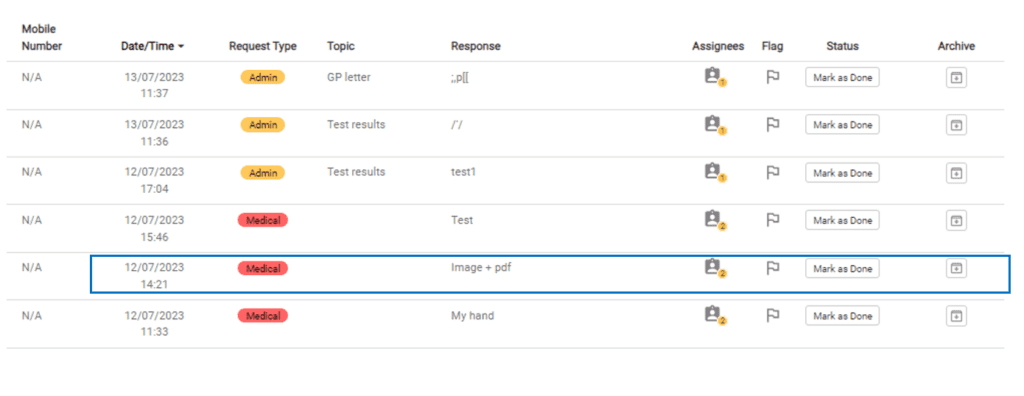
- Select the triage request you want to view.
- Click on the attachments to download and open them.
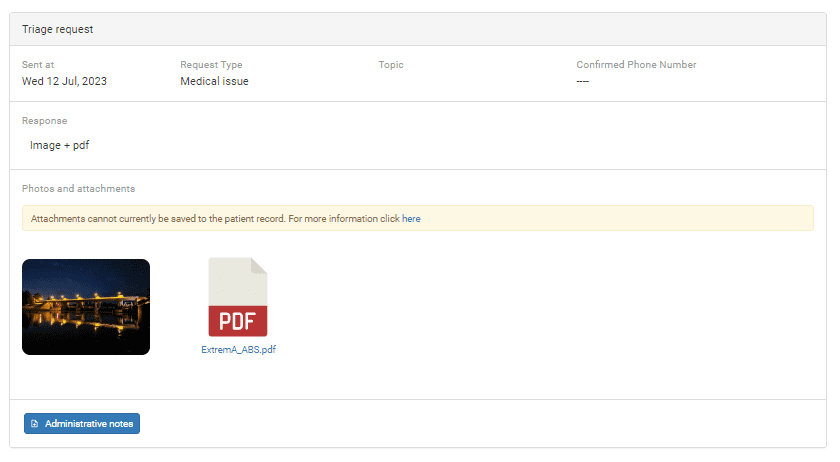
How can I save an attachment to the clinical system?
- Save or Download the attachment.
- Manually save this into your clinical system.
- If you need help adding this to your clinical system, please contact your clinical systems technical support.
© 2026 iPLATO. All rights reserved