

How to activate Third-party myGP Triage
March 9, 2021
Watch video
To add this digital front door to your practice home page, follow the steps in our helpful guide.
Once you have set up your triage system, add it to your practice home page


© 2026 iPLATO. All rights reserved
Practice Area
How to activate Third-party myGP Triage
March 9, 2021
Watch video
To add this digital front door to your practice home page, follow the steps in our helpful guide.
Once you have set up your triage system, add it to your practice home page
© 2026 iPLATO. All rights reserved
How to activate Third-party myGP Triage
March 9, 2021
To activate the feature, please follow these steps:
- Log into your myGP Connect system and go to the left-hand side menu bar and click on Settings.
- Then press on myGP Triage at the top of the screen.
- The myGP Triage settings screen will be displayed.

- By default you will be in the myGP Triage – Manual section
- Click on Third-Party tab at top of screen
- This will bring you to the Third-Party page
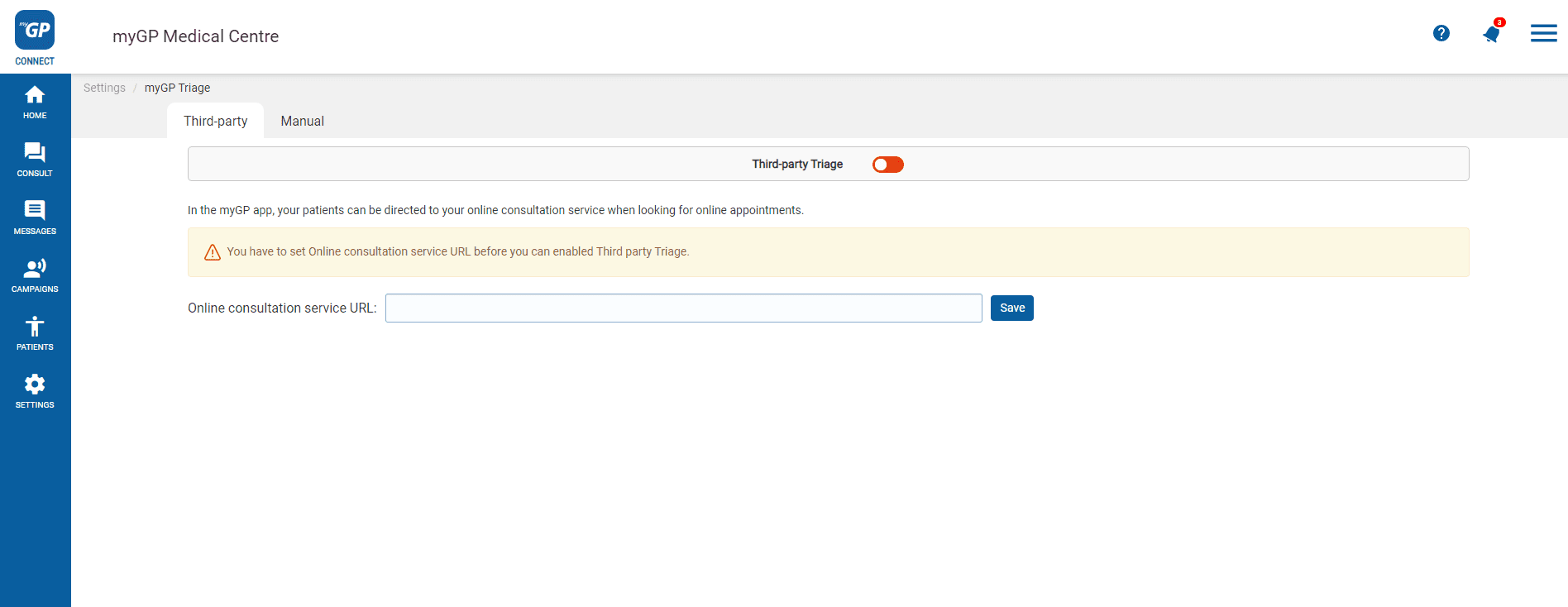
On this page, you will have the opportunity to input an third-party online consultation URL of your choice within the text field.
This will then become the triage service that is offered to patients. Follow these steps:
- Refer to the section Third-party Triage
- Copy and paste the URL you wish to include in the Enter the url of your online consultation service field
- Then hit the Save button below.
- Click Third-Party switch at the the top of the screen
- A consent pop-up box will appear.
- Click OK. If you wish to reverse this action, simply click Cancel.
- Once you have consented, the switch will activate and the service will be live.
Please Note: If you already have regular myGP Triage switched on, by activating Third-Party Triage, you will be deactivating it by default.
TOP TIP: You should only add the website address of the online consultation solution linked to your surgery. This will be the same address linked to your practice website.
© 2026 iPLATO. All rights reserved