

Getting your practices unique URL for web triage
July 20, 2023
Watch video
To add this digital front door to your practice home page, follow the steps in our helpful guide.
Once you have set up your triage system, add it to your practice home page


© 2026 iPLATO. All rights reserved
Practice Area
Getting your practices unique URL for web triage
July 20, 2023
Watch video
To add this digital front door to your practice home page, follow the steps in our helpful guide.
Once you have set up your triage system, add it to your practice home page
© 2026 iPLATO. All rights reserved
Getting your practices unique URL for web triage
July 20, 2023
To help your patients access your Triage solution, you will need to add your unique URL to your website
How to get a unique URL for your practice
Your link will look like the one shown below (example only), however, your practice will have its own 3-letter code that will sit at the end of the link.
https://request.mygp.com/ILF
Your full link with code can be found on the Triage setup page in the iPLATO Connect platform.
- Go to your iPLATO Connect platform, and click on Settings>myGP Triage.
- Find the web address at the top of the screen
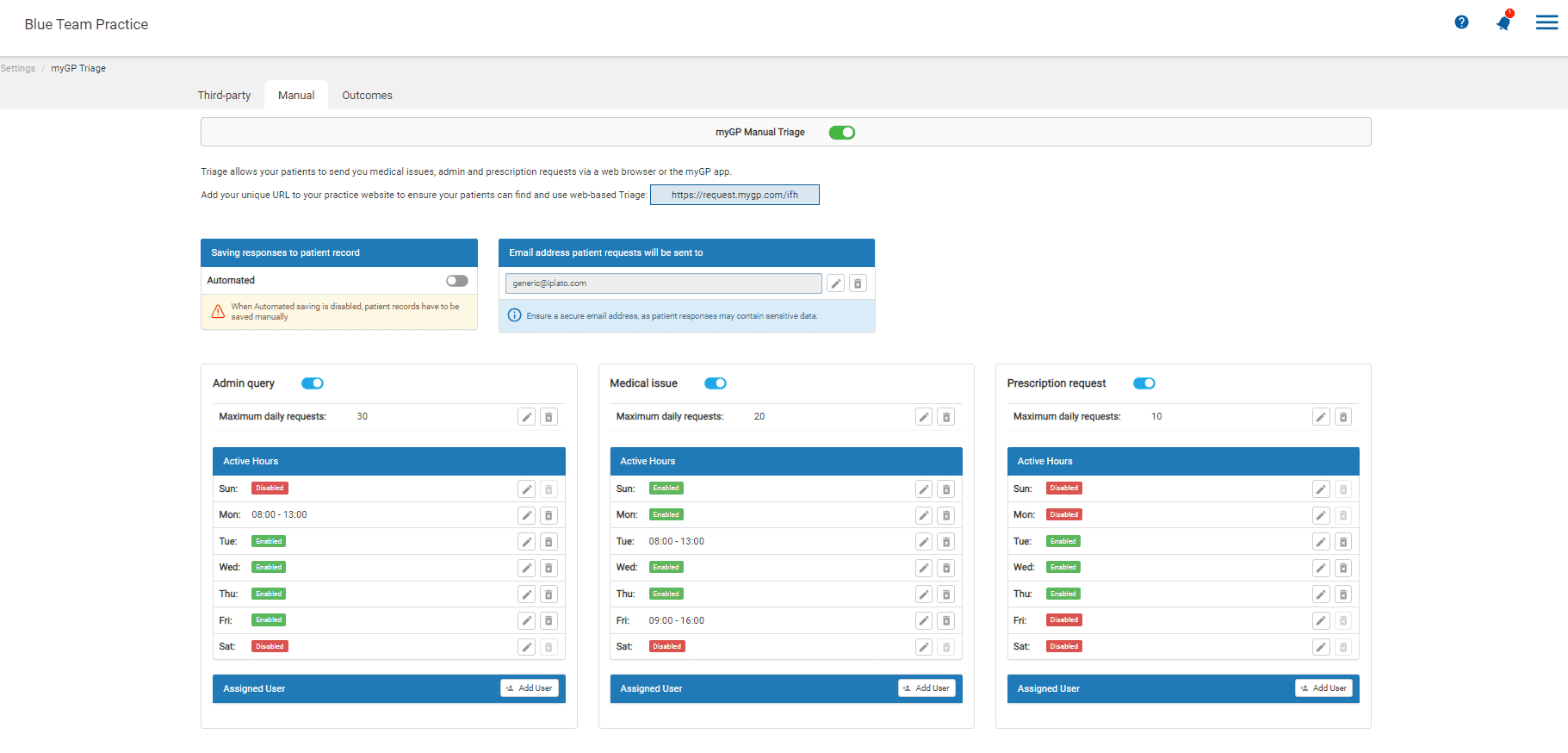
- The full link with the 3-digit code will be shown at the top
- Use this link to plug into your practice website, your IT support can help with this.
Need help?
If you need help accessing your web link, please reach out to our customer success team on customer.success@iplato.com
© 2026 iPLATO. All rights reserved