

How to create a template for Coronavirus Vaccination Campaign
June 27, 2019
Please be aware you are not currently able to save an attachment from a patient directly into the patient record on your clinical system.
What to do if you want to save an attachment into the clinical system
- Save or Download the attachment.
- Manually save this into your clinical system.
- If you need help adding this to your clinical system, please contact your clinical systems technical support.
Will you be adding this feature later?
Yes, at a later point, you will be able to save attachments directly into your clinical system, we will let you know when this becomes available.


© 2026 iPLATO. All rights reserved
Practice Area
How to create a template for Coronavirus Vaccination Campaign
June 27, 2019
Please be aware you are not currently able to save an attachment from a patient directly into the patient record on your clinical system.
What to do if you want to save an attachment into the clinical system
- Save or Download the attachment.
- Manually save this into your clinical system.
- If you need help adding this to your clinical system, please contact your clinical systems technical support.
Will you be adding this feature later?
Yes, at a later point, you will be able to save attachments directly into your clinical system, we will let you know when this becomes available.
© 2026 iPLATO. All rights reserved
How to create a template for Coronavirus Vaccination Campaign
June 27, 2019
number of clinical system specific requirements to ensure iPLATO solutions are able to sync patient and appointment data to and from your clinical system.
TPP SystmOne Specific Requirements – Gateway Machine
Due to the integration requirements of TPP SystmOne, all third-party solutions (like iPLATO services) must connect to a physical computer running at a healthcare provider. This machine must be switched on and logged into SystmOne so that iPLATO services are able to sync data. This computer is referred to as the “Gateway” by TPP.
TPP require that your “Gateway” computer is a dedicated machine running in a server room or back office. It is not recommended to be used as a terminal by end-users. This is to ensure that the computer is available 24/7 and to facilitate technical requirements of SystmOne and third-party product architecture.
Should the machine be switched off, all iPLATO services will either run ineffectively, or become unavailable. SystmOne functionality will also be degraded by the “Gateway” being inactive. This can lead to IG and Clinical Safety incidents occurring.
Please refer to your CCG IT Lead, or TPP representative for assistance on changing “Gateway” machines.
Connector
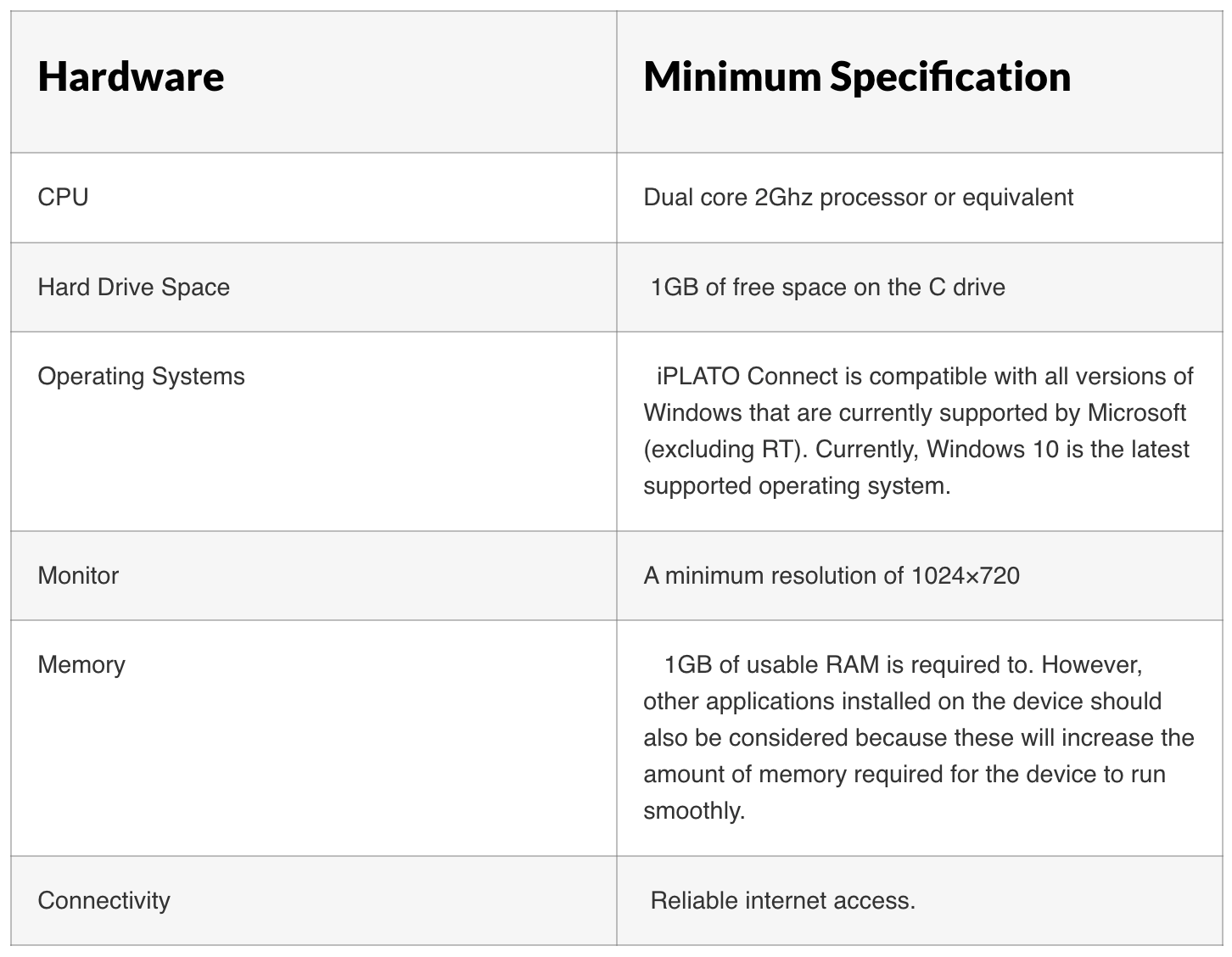
iPLATO solutions communicate with your clinical system using a small application called Connector. The hardware requirements for this application are detailed below:
Anti-Virus Requirements
You will need to ensure that the Connector is able to be white-listed by any local anti-virus service or rules, as per the following details:
Folder location: C:\iPlato\jre\bin\java.exe
What is JRE?
JRE is the Jave Run-time Environment which the Connector technology is built on.
Firewall Requirements
The following IP addresses should be white-listed on any network-based firewalls, and/or locally installed Firewall applications running on end terminals:
- 237.215.5:443
- 237.215.9:443
- 237.215.15:443
- 237.215.16:443
Installation Requirements – Windows Admin Rights
In line with SystmOne integration requirements for any partner products, it is required that an application is running on a local machine at a healthcare provider.
This application needs to be installed by a user who has Admin Rights to Windows. Consideration will need to be made to provide Admin Rights to a user, or advise iPLATO of an IT Support team that can assist with this; you can provide details to iPLATO Support via help@iplato.com.
The above requirements need to be in place, or met, before any integration can be made to SystmOne.
Queries or Problems
For all queries relating to Connector, or to report a problem with your installation you can contact iPLATO Support.
© 2026 iPLATO. All rights reserved