

How to choose Send Time for Self-Book campaign
August 4, 2020
The Self-book feature will allow you to send out a campaign message to your patients and directly invite them to a specific appointment via a link, you can even include a Patient Questionnaire for them to fill out before the appointment.
The above video shows a patient going through our lifestyle questionnaire and then booking an appointment.


© 2026 iPLATO. All rights reserved
Practice Area
How to choose Send Time for Self-Book campaign
August 4, 2020
The Self-book feature will allow you to send out a campaign message to your patients and directly invite them to a specific appointment via a link, you can even include a Patient Questionnaire for them to fill out before the appointment.
The above video shows a patient going through our lifestyle questionnaire and then booking an appointment.
© 2026 iPLATO. All rights reserved
How to choose Send Time for Self-Book campaign
August 4, 2020
- Scroll down to the Step 5: Additional options
- Click on the field for Send Date
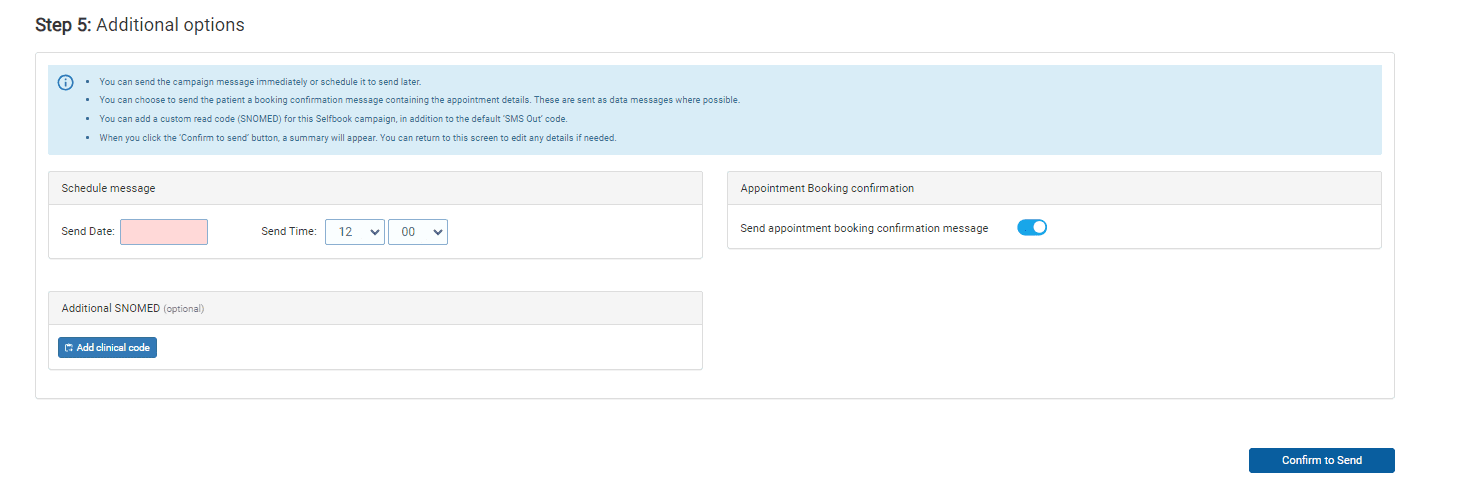
- Choose an appropriate sending time.
- In order to assign the message a clinical code click Add Clinical Code.
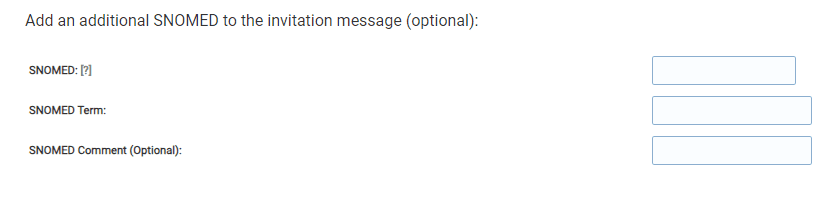
- nsert the clinical code you wish to assign into the first box.
- Once filled in, the Read Code Term will automatically fill in as well.
- The Read Code Comment field allows you to add further comments to give more detail about the message (e.g. flu invitation sent).
- Finally, decide if you wish to send an SMS confirmation message of booking.
- When ready click on Confirm to Send to take you to the final step
© 2026 iPLATO. All rights reserved