

/
iPLATO Toolbar and Remote Consultation/
Technical requirements – remote consultation toolbar
Preparing for a Project to Implement Remote Consultation
November 3, 2020
This article describes the technical requirements for the myGP desktop app.
Windows administrator rights
Windows Administrator rights are not explicitly required to install the myGP toolbar client. A regular user should be able to install on their own.
If all installation of applications are blocked for non-administrator users, local IT Support team will be required to provide assistance during installation or will need to whitelist the myGP toolbar application
Installation and folder read/write access
myGP Buddy uses the OneClick install solution from Microsoft. If you require an enterprise level installation solution, please contact myGP Support to discuss this.
Read/write access is required to these folders:
C:UsersUsername
C:UsersUsernameAppDataLocalApps2.0
C:UsersUsernameAppDataLocal
Where access to the above folders are blocked, myGP toolbar may be able to install, but would not be permitted to function.
Anti-virus
myGP Buddy could get blocked by anti-virus software. We advise that myGP is whitelisted on any CCG/CSU managed anti-virus solutions.
We work with the major anti-virus suppliers to verify the myGP toolbar application, which should reduce anti-virus software from blocking or generating errors when myGP Buddy is run.
Firewall requirements
Port 443 (HTTPS) is open
No restrictions to the address:
https://buddyapi.iplato.net/
Whitelist access to the following IP addresses:
- 212.237.215.25
- 3.8.158.27
Firewall solutions should not block the myGP Buddy application.
Proxy settings
Ensure any proxy that is in use permits access to the following domains:
- mygp.com
- iplato.net
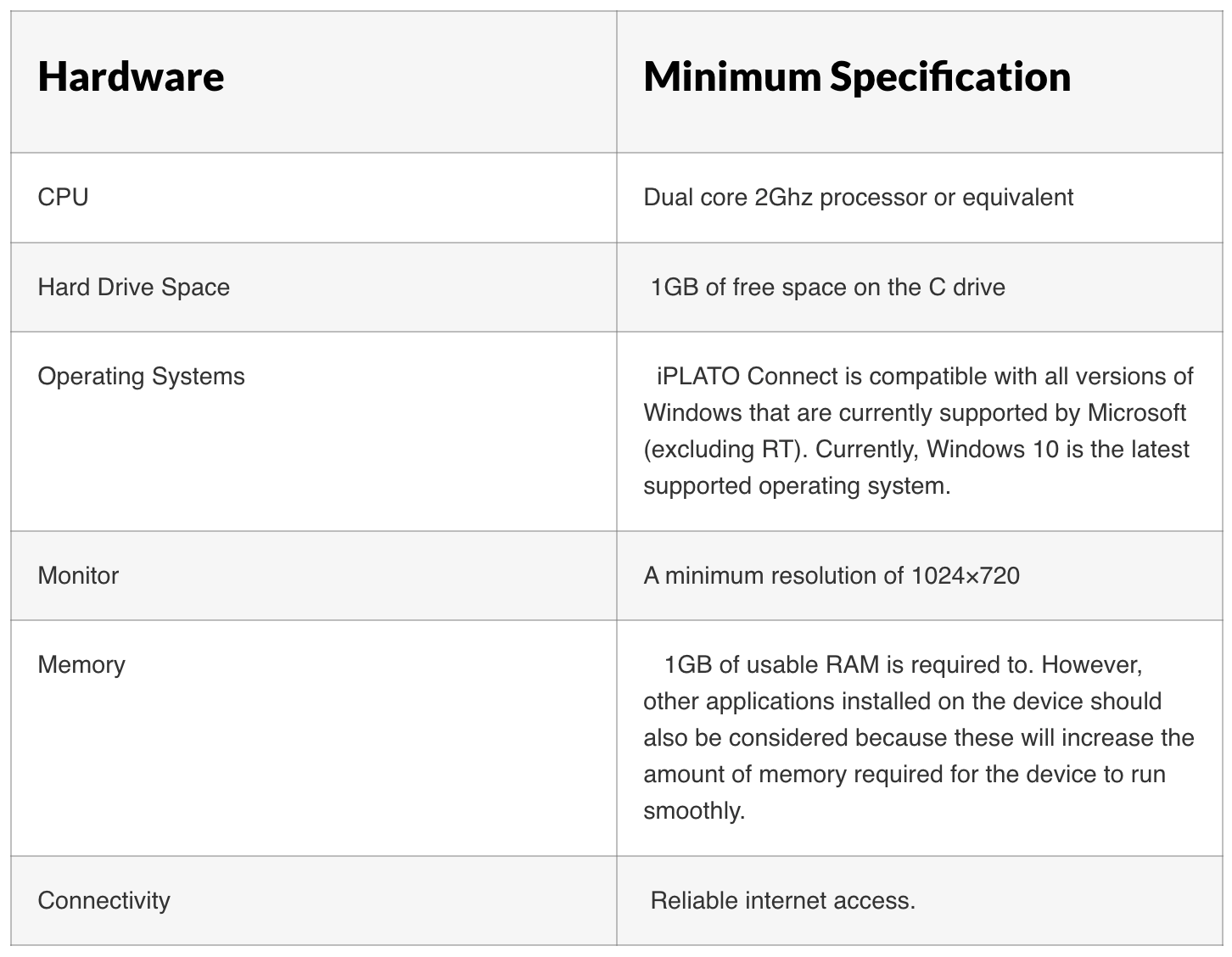
Minimum PC requirements
Compatible clinical systems
myGP is compatible with the following clinical systems:
- EMIS Web
- SystmOne
Video consultations
To ensure the smooth running of the video consultation functionality, ensure that the below technical requirements have been met:


© 2026 iPLATO. All rights reserved
Practice Area
/
iPLATO Toolbar and Remote Consultation/
Technical requirements – remote consultation toolbar
Preparing for a Project to Implement Remote Consultation
November 3, 2020
This article describes the technical requirements for the myGP desktop app.
Windows administrator rights
Windows Administrator rights are not explicitly required to install the myGP toolbar client. A regular user should be able to install on their own.
If all installation of applications are blocked for non-administrator users, local IT Support team will be required to provide assistance during installation or will need to whitelist the myGP toolbar application
Installation and folder read/write access
myGP Buddy uses the OneClick install solution from Microsoft. If you require an enterprise level installation solution, please contact myGP Support to discuss this.
Read/write access is required to these folders:
C:UsersUsername
C:UsersUsernameAppDataLocalApps2.0
C:UsersUsernameAppDataLocal
Where access to the above folders are blocked, myGP toolbar may be able to install, but would not be permitted to function.
Anti-virus
myGP Buddy could get blocked by anti-virus software. We advise that myGP is whitelisted on any CCG/CSU managed anti-virus solutions.
We work with the major anti-virus suppliers to verify the myGP toolbar application, which should reduce anti-virus software from blocking or generating errors when myGP Buddy is run.
Firewall requirements
Port 443 (HTTPS) is open
No restrictions to the address:
https://buddyapi.iplato.net/
Whitelist access to the following IP addresses:
- 212.237.215.25
- 3.8.158.27
Firewall solutions should not block the myGP Buddy application.
Proxy settings
Ensure any proxy that is in use permits access to the following domains:
- mygp.com
- iplato.net
Minimum PC requirements
Compatible clinical systems
myGP is compatible with the following clinical systems:
- EMIS Web
- SystmOne
Video consultations
To ensure the smooth running of the video consultation functionality, ensure that the below technical requirements have been met:
© 2026 iPLATO. All rights reserved
/
iPLATO Toolbar and Remote Consultation/
Preparing for a Project to Implement Remote Consultation
Preparing for a Project to Implement Remote Consultation
November 3, 2020
The NHS is going through a time of considerable change, far more significant than a clinical system switch – which is a difficult time indeed.
Below, we have collated some advice on approaching the project to implement Remote Consultation, ensuring it is fully embedded in your practice; enabling you to adopt a total triage model to primary care service delivery.
Project planning
Without proper planning, a large project like this can easily go off the rails. However, it can be easier than you might think to take some practical steps to ensure you get through all the required actions to fully implement Remote Consultation.
- Bring together a project team who will most likely be made up of the most experienced and/or senior staff at the practice
- Hold a kick-off meeting to announce to the project team that you will be implementing this solution, why you are going to use it, and what kind of impact it will have on the surgery
- Make use of the myriad of training materials we make available to understand the solution, how it works, and what you need to do to start using it
- Create an action log of work required to implement Remote Consultation and any changes you need to make to how you work, and what training needs to be provided to practice staff. This is usually a spread-sheet with columns for: Action Item, Owner, Status
- Agree to a project meeting at least once a week to review the entire project and identify any problems or delays, or to assign new action items
- Assign remote consultation champions to support practice staff to learn how to use the solution and to help with answering queries
- Hold a town hall meeting with all of your practice staff. Use this to announce that you will be implementing Remote Consultations, and provide an over-view of the solution.
Cultural change
It is important to consider that implementing a total triage model is going to dramatically change the culture of your surgery, especially with regards to how you provide a service to patients. Historically, this will have been based around face-to-face or live one-to-one interactions over the phone. Moving to a digital-first, transactional request and triage model will reduce the amount of live interaction with patients, meaning that staff may feel more distant to patients, or overly attached to their computer.
However, it is important to make sure that practice staff understand the many benefits that can come from fully implementing a total triage, digital-first model which includes:
- Infection control of COVID-19 and other infectious diseases through minimal face-to-face interactions with patients
- Improved convenience to patients as their queries can be submitted quickly through digital means, allowing them to carry on with their work or other errands
- Reduction in telephone waiting times as many patients will choose to submit queries using digital means out of convenience
- Patient sign-posting to NHS commissioned services in the local health economy
- Reduction in unnecessary GP appointments through effective total triage
- More structured workflow as majority of work-load will be processed within digital queues that can be scheduled and rotated among practice staff
Stay positive
Implementing change in any organisation can be very challenging. It is important to foster a culture of positivity.
Issues should be seen as teething problems to be ironed out. Use the concept of continual improvement to allow staff to spot errors, or faults in any processes and to find ways to learn from them – so that an improvement can be implemented. This should not be seen as any form of punishment, but as a mature way of spotting what needs improving.
Remember not to get too focussed on what has been going wrong – this is natural. Instead, take conscious effort to celebrate what has been working, how the team has performed, and what positive feedback patients have provided about the service you have delivered.
In the first few weeks of the implementation, you may find it beneficial to hold a huddle in the waiting room, or other large space. Some project management models call this a stand-up, because traditionally members of a project team stand whilst updates are provided; keeping the meeting short. Taking no more than 10 minutes to say some brief words about what went well the previous day, and what to keep in mind for the day ahead, can help to bring everyone together and to remain on the same page.
Consider holding a guided meditation session of around 15 minutes to allow practice staff to clear their minds and enjoy a moment of calm. If you don’t have someone who can run this for you (there may be a local charity) there are lots of apps and Youtube videos which provide guided audio meditation sessions. In these difficult times, and after some hard days as your surgery works hard to adapt and serve patients in this new way, taking a few minutes out to reset can be hugely beneficial.
Understand the solution
It is very easy for practice staff to only learn the elements of the Remote Consultation solution they would use as part of their job, without ever seeing or experiencing what the patient would see.
Ask yourself these questions:
- How many times have you, during the average day, called your own surgery number and experienced your automated greetings, menu options, and waiting times?
- Have you ever ordered a prescription using myGP?
- Have you had a video consultation?
Answering no to the above can be a little embarrassing. However, this is just an illustration of the importance of understanding the entire total triage model you are implementing at your surgery.
Ensure staff have the same opportunity to experience the entire Remote Consultation solution, myGP app, and total triage model you are implementing. This will allow everyone to explain the benefits of the solution and to assist patients with any queries they have about using Remote Consultation.
Book in time in staff diaries to have dedicated learning time, allowing them to attend our live webinars, watch our training tutorials, and to read our Help materials. Track that everyone has had this time allotted, and that they have consumed the training.
Capacity Planning
Use capacity planning tools to determine where you can expect peak levels of demand from patients. This will allow you to plan your staffing to ensure that you have the right administrative and clinical resources working when patients will be making requests.
Consider the different outcomes that are possible when triaging appointments, and how many appointments or interactions this will involve per day. You will need to ensure that there are sufficient resources to complete each of these pieces of work, or to complete consultations.
A large amount of time will be spent by administrative and clinical staff assessing, or processing patient requests and triaging. It is important to consider when this work will be done, and how it will fit around the other work that your surgery needs to do.
You should be able to use the reporting features of your clinical system to understand the types of appointments booked, problem clinical codes filed, QoF work completed, and prescriptions issued to perform analysis of workload.
Plan to be over-staffed for the first few weeks. It is likely that there will be a peak in demand in the first few weeks of the implementation as you work through any backlogs, recalculate demand levels, and adapt to this new way of working.
Promote the service
It is important to ensure that patients understand that there is a new way to interact with the surgery. The following are great steps that can be taken to make patients aware of the new approach:
- Use our free myGP Recruitment Service to promote this service to your patients via a text message invite
- We provide a host of marketing materials right here for your website and social media channels
- Consider advertising on local radio stations
- Change the automated greetings and menus on your phone system to promote the service, including endorsement from a senior GP at the surgery
- Provide clear guidance on your practice website
- Use social media to promote the service, including any prominent Facebook groups
- Agree a script for all practice staff to follow on the phone and in person when discussing the service
- Advise patients that fit notes, letters, and other correspondence will be sent electronically, or posted if there is no alternative
Data Security & Protection (Information Governance)
Make sure to work with your practice’s Data Protection Officer to ensure that you remain DS&P compliant, and complete a data protection impact assessment (DPIA).
The iPLATO Terms & Conditions details the required legal agreements to permit the processing of data by iPLATO solutions. You can also review the IG FAQ for answers to many common questions we get from practices.
Clinical Governance
Ensure that you have considered how you will ensure that your clinical activities remain safe by putting in place good governance and review of quality. Whilst we are not able to advise on how to do this, we recommend ensuring that this work-stream is assigned to an experienced GP.
You may need to discuss this with your CCG, who may be able to provide specific guidance on clinical governance around the use of remote consultation solutions, such as video and telephone consultation, remote prescribing, triage, and many other areas.
© 2026 iPLATO. All rights reserved