

Benefits of preGP signposting
January 29, 2021
Now that you have the myGP preGP service activated, there are a few areas you should consider as part of the ongoing upkeep of the service. This will ensure your practice always gets the most out of preGP.
Appointments Available Online in myGP
PreGP works best when you have available appointments in the myGP app. Having available appointments means:
- Reduced workload for your admin staff
- Improves the opportunity for myGP preGP to trigger and show signposts
- Helps reduce unnecessary GP appointments
- Empowers patients by helping them access their healthcare options
- Adding New Local Services
As new services are commissioned in the local health economy, you will likely want to add these to preGP as alternatives to a GP appointment.
We recommend that you do not exceed 6 services within preGP as this will lead to excessive scrolling within the Local Services sign-posting screen of the app. This will make this sign-posting screen less effective and may also lead to confusion amongst patients.
Adding New Local Services
As new services are commissioned in the local health economy, you will likely want to add these to preGP as alternatives to a GP appointment.
We recommend that you do not exceed 6 services within preGP as this will lead to excessive scrolling within the Local Services sign-posting screen of the app. This will make this sign-posting screen less effective and may also lead to confusion amongst patients.
Click here to learn more
Managing Telephone and Nurse Appointments
preGP requires your practice to use timed slots and have specific Slot Types for Telephone and Nurse appointments. This is due to these Slot Types being hidden from the normal booking functionality within myGP.
If you need to change the behaviour of Nurse and Telephone appointments within preGP, we would recommend contacting our Support team so we can discuss your needs in depth.
New Clinicians
When new doctors and nurses join your surgery, you should update your settings for myGP and myGP preGP. Once you have added available appointments to your new Session Holder in your clinical system, they will appear within myGP settings (please allow up to 30 minutes for the new Session holder to appear in myGP Connect).
Click here to Learn more
What should we do if we have concerns about any increased appointment usage?
PreGP is a new way for patients to interact with your practice, preGP leads to improved avoidance of unnecessary GP appointments, deploying your clinical resources more accurately to patients who need it. The service uses education rather than “triaging” to signpost patients to alternatives to GP appointments and you should start to see benefits within Month 1. PreGP helps empower patients by giving them the ability to keep their original GP appointment if they need too.
Patients may have seen an alternative clinician (such as a pharmacist) as sign-posted and decided/been advised to still see a GP. For example, this could mean a patient sees both a nurse and a GP. But, in reality this should be true for only a limited number of patient interactions.
We would advise to allow the service to perform as naturally as possible without intervening too early to adjust any configuration. If you have any concerns after using preGP for around 3 months, you should speak to the Support team for guidance on any adjustments that can be made to your configuration.


© 2026 iPLATO. All rights reserved
Practice Area
Benefits of preGP signposting
January 29, 2021
Now that you have the myGP preGP service activated, there are a few areas you should consider as part of the ongoing upkeep of the service. This will ensure your practice always gets the most out of preGP.
Appointments Available Online in myGP
PreGP works best when you have available appointments in the myGP app. Having available appointments means:
- Reduced workload for your admin staff
- Improves the opportunity for myGP preGP to trigger and show signposts
- Helps reduce unnecessary GP appointments
- Empowers patients by helping them access their healthcare options
- Adding New Local Services
As new services are commissioned in the local health economy, you will likely want to add these to preGP as alternatives to a GP appointment.
We recommend that you do not exceed 6 services within preGP as this will lead to excessive scrolling within the Local Services sign-posting screen of the app. This will make this sign-posting screen less effective and may also lead to confusion amongst patients.
Adding New Local Services
As new services are commissioned in the local health economy, you will likely want to add these to preGP as alternatives to a GP appointment.
We recommend that you do not exceed 6 services within preGP as this will lead to excessive scrolling within the Local Services sign-posting screen of the app. This will make this sign-posting screen less effective and may also lead to confusion amongst patients.
Click here to learn more
Managing Telephone and Nurse Appointments
preGP requires your practice to use timed slots and have specific Slot Types for Telephone and Nurse appointments. This is due to these Slot Types being hidden from the normal booking functionality within myGP.
If you need to change the behaviour of Nurse and Telephone appointments within preGP, we would recommend contacting our Support team so we can discuss your needs in depth.
New Clinicians
When new doctors and nurses join your surgery, you should update your settings for myGP and myGP preGP. Once you have added available appointments to your new Session Holder in your clinical system, they will appear within myGP settings (please allow up to 30 minutes for the new Session holder to appear in myGP Connect).
Click here to Learn more
What should we do if we have concerns about any increased appointment usage?
PreGP is a new way for patients to interact with your practice, preGP leads to improved avoidance of unnecessary GP appointments, deploying your clinical resources more accurately to patients who need it. The service uses education rather than “triaging” to signpost patients to alternatives to GP appointments and you should start to see benefits within Month 1. PreGP helps empower patients by giving them the ability to keep their original GP appointment if they need too.
Patients may have seen an alternative clinician (such as a pharmacist) as sign-posted and decided/been advised to still see a GP. For example, this could mean a patient sees both a nurse and a GP. But, in reality this should be true for only a limited number of patient interactions.
We would advise to allow the service to perform as naturally as possible without intervening too early to adjust any configuration. If you have any concerns after using preGP for around 3 months, you should speak to the Support team for guidance on any adjustments that can be made to your configuration.
© 2026 iPLATO. All rights reserved
Benefits of preGP signposting
January 29, 2021
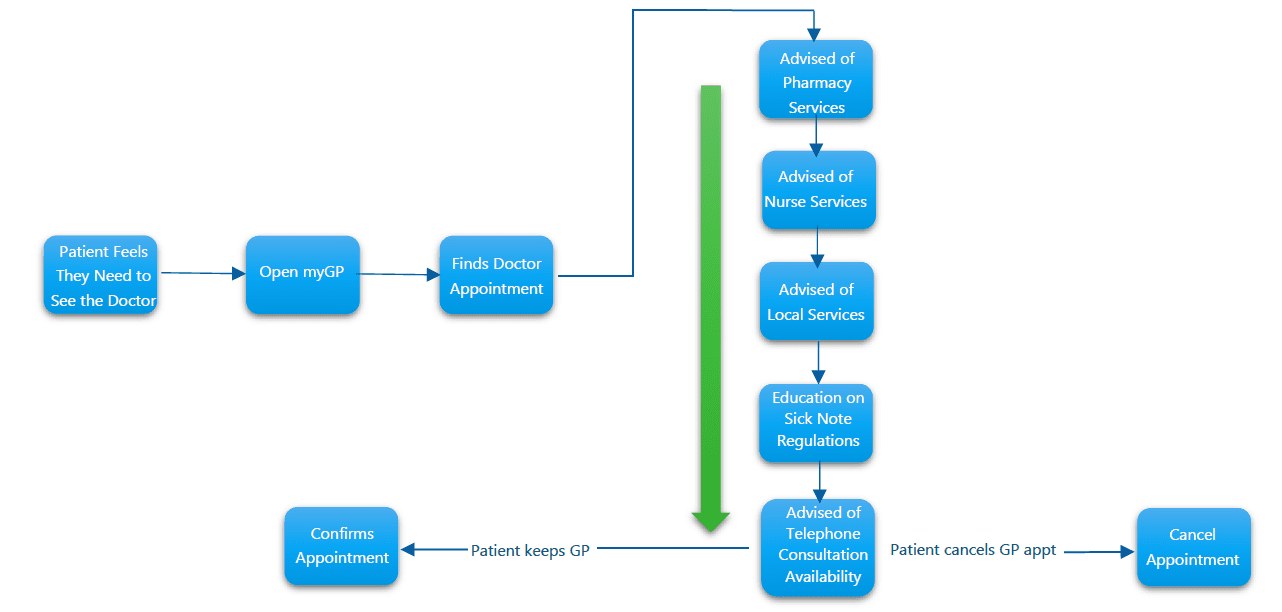
preGP™ is the Online Consultation solution from myGP Connect. Unlike other solutions, preGP does not attempt to “triage” or “diagnose” a patient.
Instead, the service uses education to advise a patient of alternatives to a GP appointment, and empowers the patient to take action if they wish.
preGP does not generate new tasks or workflow items. Instead, it automates the avoidance of unnecessary GP appointments and promotes patients providing further context about their health issue where an appointment is required.
Avoiding Unnecessary GP Appointments
In 2015, the ‘Making Time in General Practice’ report found that 27% of GP appointments were unnecessary and could have been handled largely by self-help, alternative clinicians, and services within the local health economy.
preGP targets the avoidance of 12% of unnecessary GP appointments that trigger its functionality during the booking process within myGP®, the patient facing services app from myGP Connect.
Is it safe?
In 2017, iPLATO Healthcare were funded by SBRI (an organisation that funds innovative technology for the NHS) to develop and pilot preGP. The service was deployed in a South-East London practice for 30 days. The service generated practice efficiency savings of £1,949.
An independent health economist reviewed the service for SBRI and found that preGP could save the NHS over £150 million annually.
Results of Pilot
Other Online Consultation solutions on the market require practices to avoid the use of Patient Online apps and use a separate website instead. This does not promote the use of patient facing services and can lead to poor performance in the shared commitment within the GMS contract.
However, preGP is built directly into the myGP patient facing services app. This means you can make use of the benefits of preGP, whilst simultaneously meeting your contractual requirements for Patient Online.
In fact, the better you perform against your Patient Online requirements using myGP, the more benefits you will see from preGP as more patients will trigger the functionality.
Meeting Patient Online Targets and Using GP Resources Wisely
preGP, like all other myGP Connect services, is a cloud-based technology. There is nothing to install, and no adjustments required to your practice website – unlike other products on the market.
Our experienced deployment team will activate the service and guide you through the configuration. The service uses existing workflows within your clinical system and does not generate any new tasks or reports for your clinical staff. Instead, the service either automatically cancels an unnecessary GP appointment, or books an appointment as any other patient facing services app would.
There are no patches, fixes, enhancements, or integrations to worry about.
You can always check .//service-status/ to check on the technical status of our services. preGP only requires myGP to be active and have appointments available.
© 2026 iPLATO. All rights reserved