

/
The NHS app and iPLATO campaign messaging/
All you need to know about NHS app messaging
NHS app and Key word replies
October 5, 2023
What is happening?
All practices have been given a target of getting 80% of their patients on the NHS app by the end of 2024.
What is NHS app messaging?
Glad you asked.
In December 2022 iPLATO became one of the first to integrate with the NHS app in England, sending messages to patients using the NHS app rather than via SMS.
From iPLATO, this means messages that go via the NHS include:
- Patient Questionanires
- Batch messages including Key word replies
- Appointment Reminders
This means that you have already been sending messages via the NHS app, for free!
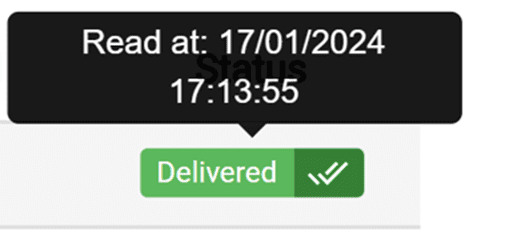
We can even tell you when a patient reads their message. Have a look at our page on Read Receipts.
How do I send messages to the NHS app from iPLATO?
- Easy! Just send your messages as normal, your iPLATO system does the hard work for you and will automatically send the message to a patient’s NHS app if they have one.
- This includes asking for a patient response via a keyword, CLICK HERE for more details on keyword replies.
Does a patient need to do anything in the NHS app to receive messages?
- Yes, only patients who have enabled notifications in the NHS app can receive messages from you this way.
- However, once this is done, all future messages will be sent via the app, keeping everything in one place.
- Not only that, the process is seamless for the patient, once they have logged into the NHS app, they don’t have to enter a DOB or authenticate any other way to receive messages.
Which of my patients has the NHS app?
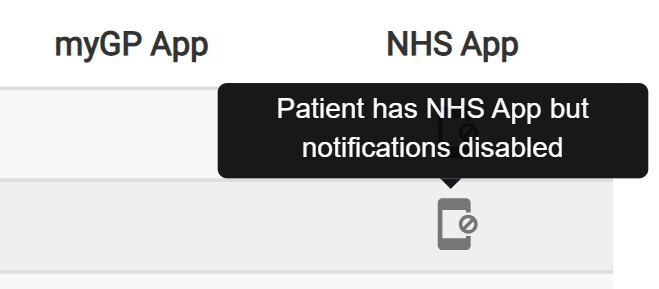
- We can show you who at your practice has downloaded the NHS app, not only that we can also show you who has also turned on their notifications in the NHS app.
- This is important because only the patients who have enabled notifications will be able to receive messages via the NHS app, so you will want to let your patients know this to get the most out of it.
- CLICK HERE to see how to search for your NHS app patients.
How to promote NHS app use at your surgery
The NHS has provided resources for you to use to help get the word out! The following are all from the NHS.
- An overview for your practice on how to use NHS app and messaging.
- Messaging templates to let patients know about the app and what to do.
- Templates and banners to use for your website and social media channels.
- NHS page for patients
- NHS guide for patients to turn on notifications in the NHS app.
Great! What’s next?
- Appointment Reminder messaging within the NHS app has already been released!
How does this work?
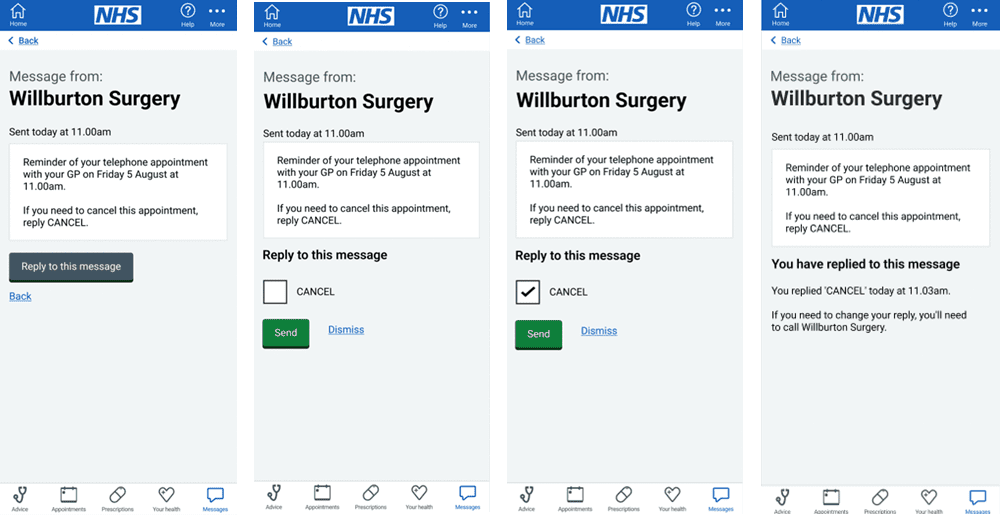
- Simple, all within the NHS app, the patient won’t leave the app, the option to reply will be right there as a selectable response.
- And even better, you don’t have to change anything, you carry on using iPLATO just as you always have.
- Have a look at the below example to see how it could work.
Sending links in the NHS app
A top tip when sending messages out to patients is to use links to provide more infomration, so you dont have to cram it all into the SMS.
It is vital that when sending a link, you send the whole link, including the http:// at the beginning of the web page. The reason for this is that links that start www. in the NHS app do not open, the full link is needed.
If you need to, simply copy the full link out of the address bar and paste, like the example below.



© 2026 iPLATO. All rights reserved
Practice Area
/
The NHS app and iPLATO campaign messaging/
All you need to know about NHS app messaging
NHS app and Key word replies
October 5, 2023
What is happening?
All practices have been given a target of getting 80% of their patients on the NHS app by the end of 2024.
What is NHS app messaging?
Glad you asked.
In December 2022 iPLATO became one of the first to integrate with the NHS app in England, sending messages to patients using the NHS app rather than via SMS.
From iPLATO, this means messages that go via the NHS include:
- Patient Questionanires
- Batch messages including Key word replies
- Appointment Reminders
This means that you have already been sending messages via the NHS app, for free!
We can even tell you when a patient reads their message. Have a look at our page on Read Receipts.
How do I send messages to the NHS app from iPLATO?
- Easy! Just send your messages as normal, your iPLATO system does the hard work for you and will automatically send the message to a patient’s NHS app if they have one.
- This includes asking for a patient response via a keyword, CLICK HERE for more details on keyword replies.
Does a patient need to do anything in the NHS app to receive messages?
- Yes, only patients who have enabled notifications in the NHS app can receive messages from you this way.
- However, once this is done, all future messages will be sent via the app, keeping everything in one place.
- Not only that, the process is seamless for the patient, once they have logged into the NHS app, they don’t have to enter a DOB or authenticate any other way to receive messages.
Which of my patients has the NHS app?
- We can show you who at your practice has downloaded the NHS app, not only that we can also show you who has also turned on their notifications in the NHS app.
- This is important because only the patients who have enabled notifications will be able to receive messages via the NHS app, so you will want to let your patients know this to get the most out of it.
- CLICK HERE to see how to search for your NHS app patients.
How to promote NHS app use at your surgery
The NHS has provided resources for you to use to help get the word out! The following are all from the NHS.
- An overview for your practice on how to use NHS app and messaging.
- Messaging templates to let patients know about the app and what to do.
- Templates and banners to use for your website and social media channels.
- NHS page for patients
- NHS guide for patients to turn on notifications in the NHS app.
Great! What’s next?
- Appointment Reminder messaging within the NHS app has already been released!
How does this work?
- Simple, all within the NHS app, the patient won’t leave the app, the option to reply will be right there as a selectable response.
- And even better, you don’t have to change anything, you carry on using iPLATO just as you always have.
- Have a look at the below example to see how it could work.
Sending links in the NHS app
A top tip when sending messages out to patients is to use links to provide more infomration, so you dont have to cram it all into the SMS.
It is vital that when sending a link, you send the whole link, including the http:// at the beginning of the web page. The reason for this is that links that start www. in the NHS app do not open, the full link is needed.
If you need to, simply copy the full link out of the address bar and paste, like the example below.
© 2026 iPLATO. All rights reserved
NHS app and Key word replies
October 5, 2023
You can now send any type of manual message to your patient via the NHS app
The patient needs to have downloaded the NHS app and switched on notifications.
Click here for details on how to find out from your Connect system which patients have done this and which have not.
What are keyword replies?
- Do you want your patient to respond to your message but only with a controlled, one-word response? This is a keyword reply.
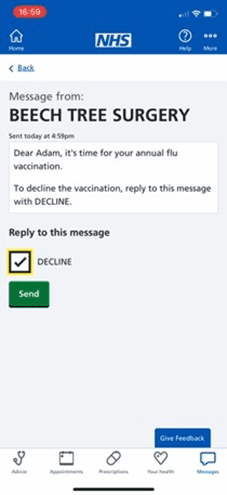
- For example, all your seasonal flu invites could be keyword reply messages, as many practices use the word DECLINE as a Keyword reply.
- Keyword replies are what you know as Trigger words in your iPLATO Connect system. If you have set up an active Trigger word on your Connect system, this will act as a Keyword reply for you when you send a message from iPLATO to the NHS app.
- Below is a video of how this will work, using just a simple DECLINE option.
Watch video
How does this work? Setting up Trigger words
- For keyword replies to work, you will need to have activated your chosen keyword reply word in your iPLATO Connect system
- Below is a screenshot of your iPLATO Connect system, it shows your Trigger words.
- Of the 4 examples below, only the word DECLINE would function as a Keyword in the NHS app, as it is the only one that is active (shown with a GREEN dot)

- Click here for a guide on creating your reply trigger words.
Multiple responses
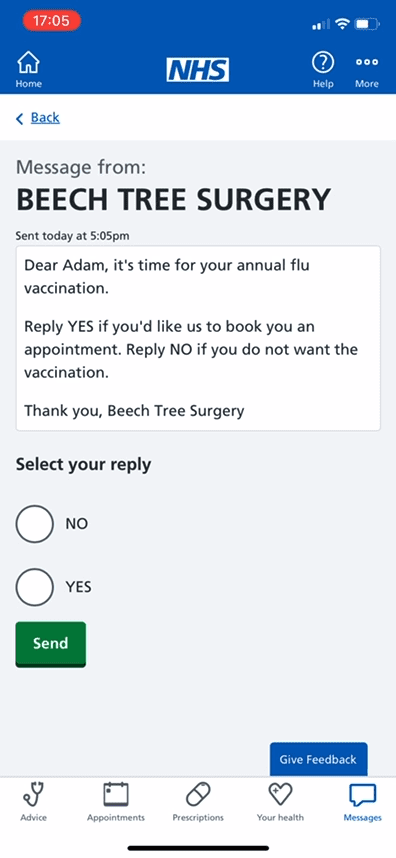
- It is possible to give your patient multiple-choice Keyword responses, below is an example. TOP TIP: The above is an example only, we would recommend NOT using words like yes and no, as they are common words.
To find out if you have Keyword reply ability for your surgery, contact your ICB.
© 2026 iPLATO. All rights reserved