

Where are Sent messages located?
July 2, 2020
It is important to note that if the patient does confirm a change in contact details, these are not automatically updated on the patients’ record.
Below is the coding that will be shown based on the patients’ answers
New mobile number given
- Snomed: 428481002
- EMIS Read code V2: 915J.
- TPP Read code V3: XaQgn
- Term: Information provided by patient via digital questionnaire.
New landline number given
- Snomed: 184103008
- EMIS Read code V2: 9159.
- TPP Read code V3: .9159
- Term: Information provided by patient via digital questionnaire.
New home address number given
- Snomed: 184097001
- EMIS Read code V2: 9153.
- TPP Read code V3: .9153
- Term: Information provided by patient via digital questionnaire.
New email number given
- Snomed: 424966008
- EMIS Read code V2: 915K.
- TPP Read code V3: XaYak
- Term: Information provided by patient via digital questionnaire.
IMPORTANT – Staff should then update the patients’ details and record themselves with the new information.


© 2026 iPLATO. All rights reserved
Practice Area
Where are Sent messages located?
July 2, 2020
It is important to note that if the patient does confirm a change in contact details, these are not automatically updated on the patients’ record.
Below is the coding that will be shown based on the patients’ answers
New mobile number given
- Snomed: 428481002
- EMIS Read code V2: 915J.
- TPP Read code V3: XaQgn
- Term: Information provided by patient via digital questionnaire.
New landline number given
- Snomed: 184103008
- EMIS Read code V2: 9159.
- TPP Read code V3: .9159
- Term: Information provided by patient via digital questionnaire.
New home address number given
- Snomed: 184097001
- EMIS Read code V2: 9153.
- TPP Read code V3: .9153
- Term: Information provided by patient via digital questionnaire.
New email number given
- Snomed: 424966008
- EMIS Read code V2: 915K.
- TPP Read code V3: XaYak
- Term: Information provided by patient via digital questionnaire.
IMPORTANT – Staff should then update the patients’ details and record themselves with the new information.
© 2026 iPLATO. All rights reserved
Where are Sent messages located?
July 2, 2020
If you wish to view any messages that have been sent from you myGP Connect system, they are stored within the Sent tab.
To reference this section, please do the follow steps:
- Log in to your myGP Connect system
- Click on Messages found on the left-hand side menu
- Click on Sent
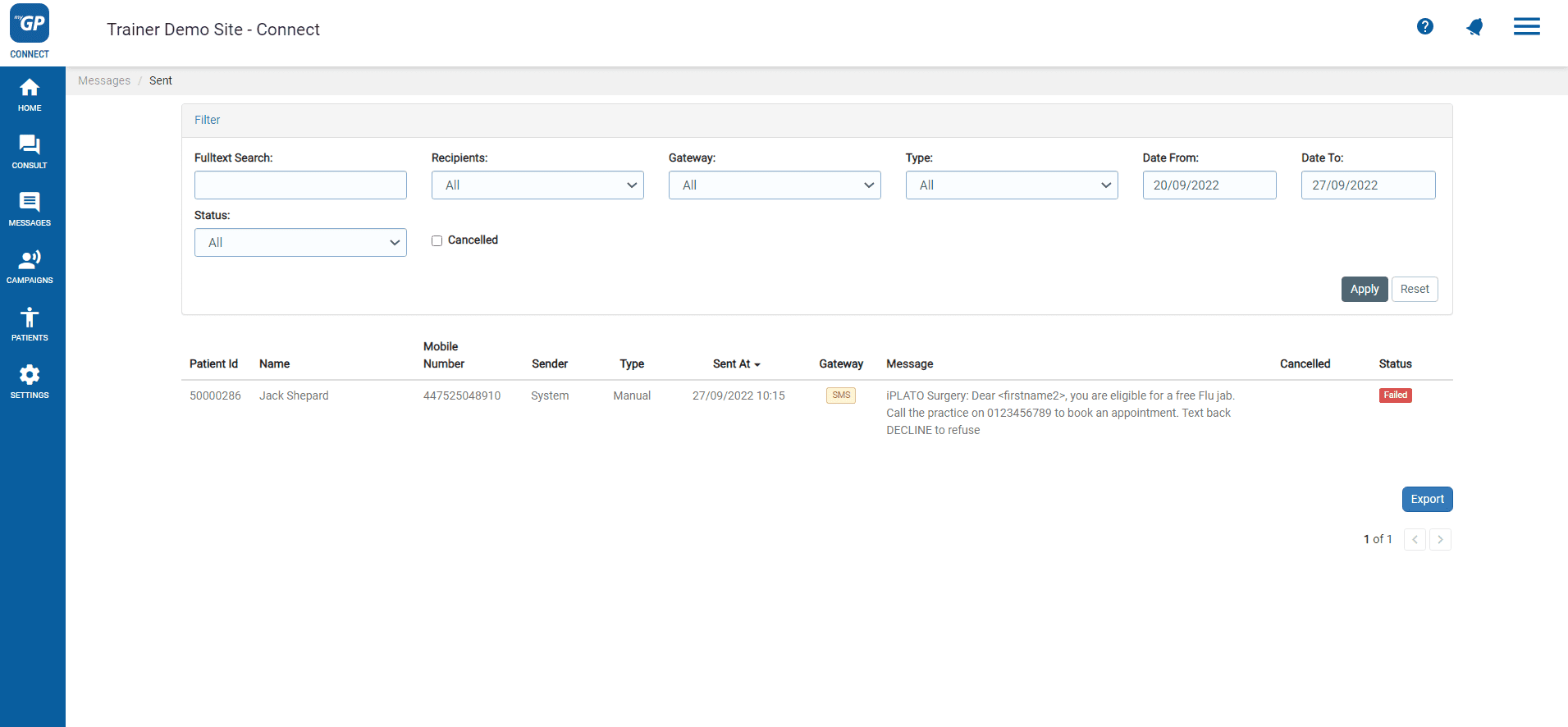
Here you will be able to view any sent messages from myGP Connect. It will break the messages down into the following information columns:
- Patient ID: the patient’s ID number from your clinical system
- Name: the patient’s first name and last
- Mobile Number: patient’s registered mobile phone number
- Sender: which myGP Connect user created message
- Send at: the date and time of when the message was received
- Type: if message is a manual or automatic message
- Gateway: if message are received via SMS, myGP App or NHS App
- Message: the message that will be sent
- Cancelled: if message has been cancelled
- Status: what is the current stage of the message
In the Status area, you will have different corresponding terms to explain the current stage of the message, these are:
- Scheduled: the message has been programmed to send at a later date
- Delivered: the message was successfully sent and delivered to patient’s phone
- Failed: are messages that were rejected by the operator SMS gateway or the operator has reported the mobile number has temporarily been deactivated (e.g. their phone number no longer exists), or it is due to number being disconnected.
- Expired: are messages that were accepted by the operator SMS gateway but were not successfully delivered to the recipient mobile phone. They will expire after 72 hours (e.g. recipient is out of the country). Also this applies if mobile phone has been switched off or there is no signal for 72 hours.
TOP TIP: if you wish to see the message received by your recipient, hover your cursor over the i icon to the right of message. A pop-up will appear with the message exactly as it was sent to recipient.
© 2026 iPLATO. All rights reserved