

What is the Message Confirmation Summary?
June 30, 2020
It is important to note that if the patient does confirm a change in contact details, these are not automatically updated on the patients’ record.
Below is the coding that will be shown based on the patients’ answers
New mobile number given
- Snomed: 428481002
- EMIS Read code V2: 915J.
- TPP Read code V3: XaQgn
- Term: Information provided by patient via digital questionnaire.
New landline number given
- Snomed: 184103008
- EMIS Read code V2: 9159.
- TPP Read code V3: .9159
- Term: Information provided by patient via digital questionnaire.
New home address number given
- Snomed: 184097001
- EMIS Read code V2: 9153.
- TPP Read code V3: .9153
- Term: Information provided by patient via digital questionnaire.
New email number given
- Snomed: 424966008
- EMIS Read code V2: 915K.
- TPP Read code V3: XaYak
- Term: Information provided by patient via digital questionnaire.
IMPORTANT – Staff should then update the patients’ details and record themselves with the new information.


© 2026 iPLATO. All rights reserved
Practice Area
What is the Message Confirmation Summary?
June 30, 2020
It is important to note that if the patient does confirm a change in contact details, these are not automatically updated on the patients’ record.
Below is the coding that will be shown based on the patients’ answers
New mobile number given
- Snomed: 428481002
- EMIS Read code V2: 915J.
- TPP Read code V3: XaQgn
- Term: Information provided by patient via digital questionnaire.
New landline number given
- Snomed: 184103008
- EMIS Read code V2: 9159.
- TPP Read code V3: .9159
- Term: Information provided by patient via digital questionnaire.
New home address number given
- Snomed: 184097001
- EMIS Read code V2: 9153.
- TPP Read code V3: .9153
- Term: Information provided by patient via digital questionnaire.
New email number given
- Snomed: 424966008
- EMIS Read code V2: 915K.
- TPP Read code V3: XaYak
- Term: Information provided by patient via digital questionnaire.
IMPORTANT – Staff should then update the patients’ details and record themselves with the new information.
© 2026 iPLATO. All rights reserved
What is the Message Confirmation Summary?
June 30, 2020
When on the final steps of creating a message in myGP Connect, you will be presented with the Message Confirmation Summary pop-up box.
This pop-up appears after you click on Confirm to Send on the Sending Options page.
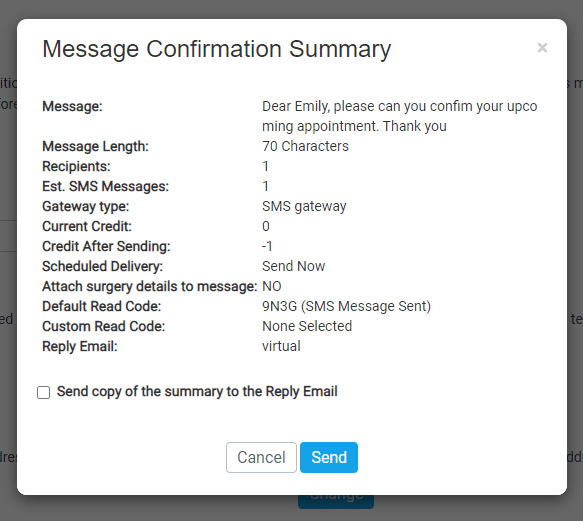
This pop-up breaks down important information concerning the message you are about to send. Below we briefly summarise each column for your understanding:
- Message: this column displays the message you will send out
- Message Length: this displays your total character count for the message
- Recipients: this displays how many recipients will recieve the message
- Current Credits: how many credits you currently have
- Credit After Sending: how many credits you will have after sending the message
- Scheduled Delivery: displays when the message will be sent
- Attach surgery details to message: if surgery details option has been included in the message
- Default Read Code: the clinical code for SMS Outgoing – Manual
- Custom Read Code: if you assigned a clinical code to the message, it will display here
- Reply Email: the email assigned to the messages response
TOP TIP: If you wish for this summary to be sent to the assigned Reply Email address, simply tick the box of Send copy of the summary to Reply Email
© 2026 iPLATO. All rights reserved