

What is a Trigger Word?
July 1, 2020
It is important to note that if the patient does confirm a change in contact details, these are not automatically updated on the patients’ record.
Below is the coding that will be shown based on the patients’ answers
New mobile number given
- Snomed: 428481002
- EMIS Read code V2: 915J.
- TPP Read code V3: XaQgn
- Term: Information provided by patient via digital questionnaire.
New landline number given
- Snomed: 184103008
- EMIS Read code V2: 9159.
- TPP Read code V3: .9159
- Term: Information provided by patient via digital questionnaire.
New home address number given
- Snomed: 184097001
- EMIS Read code V2: 9153.
- TPP Read code V3: .9153
- Term: Information provided by patient via digital questionnaire.
New email number given
- Snomed: 424966008
- EMIS Read code V2: 915K.
- TPP Read code V3: XaYak
- Term: Information provided by patient via digital questionnaire.
IMPORTANT – Staff should then update the patients’ details and record themselves with the new information.


© 2026 iPLATO. All rights reserved
Practice Area
What is a Trigger Word?
July 1, 2020
It is important to note that if the patient does confirm a change in contact details, these are not automatically updated on the patients’ record.
Below is the coding that will be shown based on the patients’ answers
New mobile number given
- Snomed: 428481002
- EMIS Read code V2: 915J.
- TPP Read code V3: XaQgn
- Term: Information provided by patient via digital questionnaire.
New landline number given
- Snomed: 184103008
- EMIS Read code V2: 9159.
- TPP Read code V3: .9159
- Term: Information provided by patient via digital questionnaire.
New home address number given
- Snomed: 184097001
- EMIS Read code V2: 9153.
- TPP Read code V3: .9153
- Term: Information provided by patient via digital questionnaire.
New email number given
- Snomed: 424966008
- EMIS Read code V2: 915K.
- TPP Read code V3: XaYak
- Term: Information provided by patient via digital questionnaire.
IMPORTANT – Staff should then update the patients’ details and record themselves with the new information.
© 2026 iPLATO. All rights reserved
What is a Trigger Word?
July 1, 2020
Watch video
A Trigger Words is a word within an outgoing message that has been assigned a clinical code, thereby if a patient responds with this word, the clinical code will be recorded over on your clinical system to your patent’s record.
A quick example is with the below Flu Invitation template:
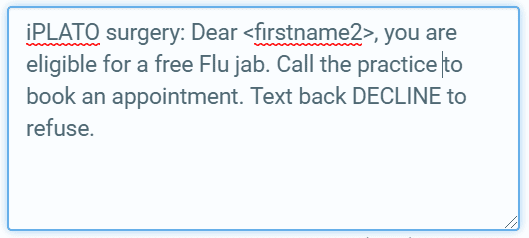
Within the template there is the expression of DECLINE. This is set to be the Trigger Word for this Flu Invitation message.
A practice can then assign the clinical code of Seasonal influenza vaccination declined, therefore if a patient replies with the word DECLINE, the code will be forwarded to the patient’s record on the clinical system.
If a patient is an NHS App user, they will still be able to receive messages sent via Connect. There are just a few things to keep in mind concerning Triagger Words:
- The system is now sending messages to NHS App wherever possible
- Currently, patients using the NHS App cannot reply to messages as the app is one-way. This will eventually be updated to work two-way.
- If your message contains a Trigger Word (e.g. DECLINE) it will automatically be sent as a standard message SMS message, and patients will be able to reply via text.
© 2026 iPLATO. All rights reserved