

How to change a messages assigned Reply Email
June 30, 2020
It is important to note that if the patient does confirm a change in contact details, these are not automatically updated on the patients’ record.
Below is the coding that will be shown based on the patients’ answers
New mobile number given
- Snomed: 428481002
- EMIS Read code V2: 915J.
- TPP Read code V3: XaQgn
- Term: Information provided by patient via digital questionnaire.
New landline number given
- Snomed: 184103008
- EMIS Read code V2: 9159.
- TPP Read code V3: .9159
- Term: Information provided by patient via digital questionnaire.
New home address number given
- Snomed: 184097001
- EMIS Read code V2: 9153.
- TPP Read code V3: .9153
- Term: Information provided by patient via digital questionnaire.
New email number given
- Snomed: 424966008
- EMIS Read code V2: 915K.
- TPP Read code V3: XaYak
- Term: Information provided by patient via digital questionnaire.
IMPORTANT – Staff should then update the patients’ details and record themselves with the new information.


© 2026 iPLATO. All rights reserved
Practice Area
How to change a messages assigned Reply Email
June 30, 2020
It is important to note that if the patient does confirm a change in contact details, these are not automatically updated on the patients’ record.
Below is the coding that will be shown based on the patients’ answers
New mobile number given
- Snomed: 428481002
- EMIS Read code V2: 915J.
- TPP Read code V3: XaQgn
- Term: Information provided by patient via digital questionnaire.
New landline number given
- Snomed: 184103008
- EMIS Read code V2: 9159.
- TPP Read code V3: .9159
- Term: Information provided by patient via digital questionnaire.
New home address number given
- Snomed: 184097001
- EMIS Read code V2: 9153.
- TPP Read code V3: .9153
- Term: Information provided by patient via digital questionnaire.
New email number given
- Snomed: 424966008
- EMIS Read code V2: 915K.
- TPP Read code V3: XaYak
- Term: Information provided by patient via digital questionnaire.
IMPORTANT – Staff should then update the patients’ details and record themselves with the new information.
© 2026 iPLATO. All rights reserved
How to change a messages assigned Reply Email
June 30, 2020
Watch video
When sending out a message all patient responses are sent, by default, to the email address saved in your user account. To send responses from the message you’ve created, to a different address, you must reassign it.
When you have created a message and you are on the Summary Confirmation page, do the following:
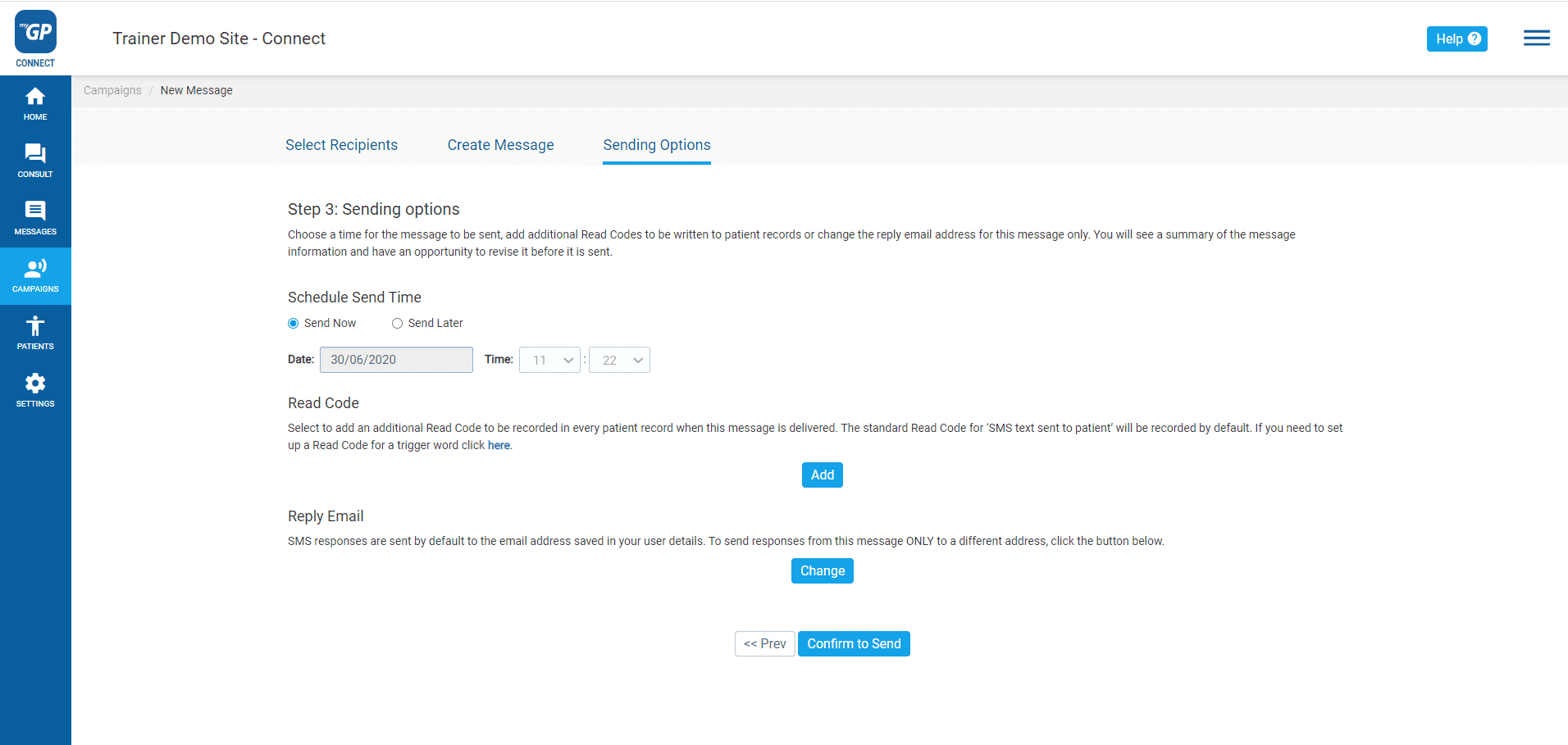
- Go to the Reply Email section and click Change
- A Reply Email pop-up box will appear
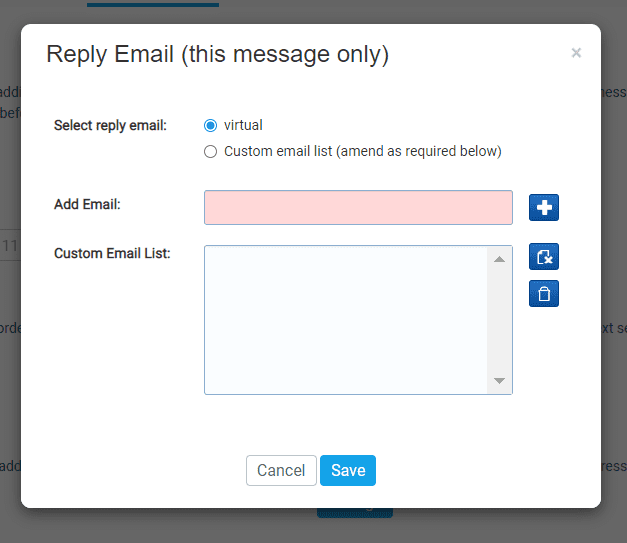
- Refer to Select reply email and choose the Custom email list option
- In the Add Email field, fill in the alternate email address you wish to assign replies to
- Click the blue + button
- Your custom email will now appear in the Custom Email List
- Highlight the email address, now click Save
This will now reassign any message replies to this alternative email address. You will be able to confirm this change when you view the Message Confirmation Summary.
Please Note: This change is not permanent. You will need to reassign the Reply Email on subsequent messages as well.
© 2026 iPLATO. All rights reserved