

Flu Campaign Pre-Checklist
May 17, 2021
Now to create the actual message for your Coronavirus Vaccination Campaign:
- Click on Campaigns tab found on the left-hand side menu
- Click on Templates
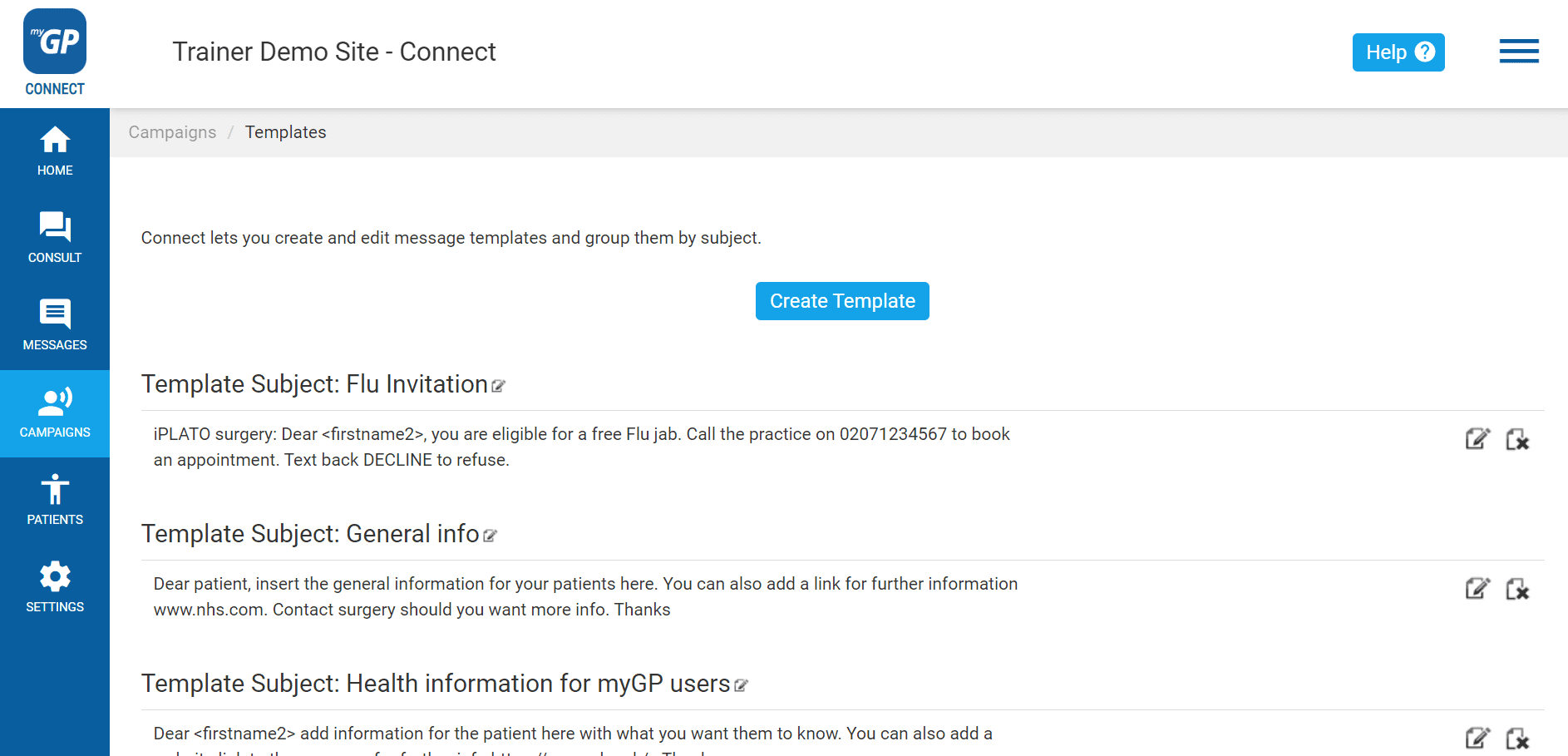
On this page, you will be able to create a template for Invitation message. To create this, do the following steps:
- Click Create Template
- This will bring up the Manual Template Message pop-up box
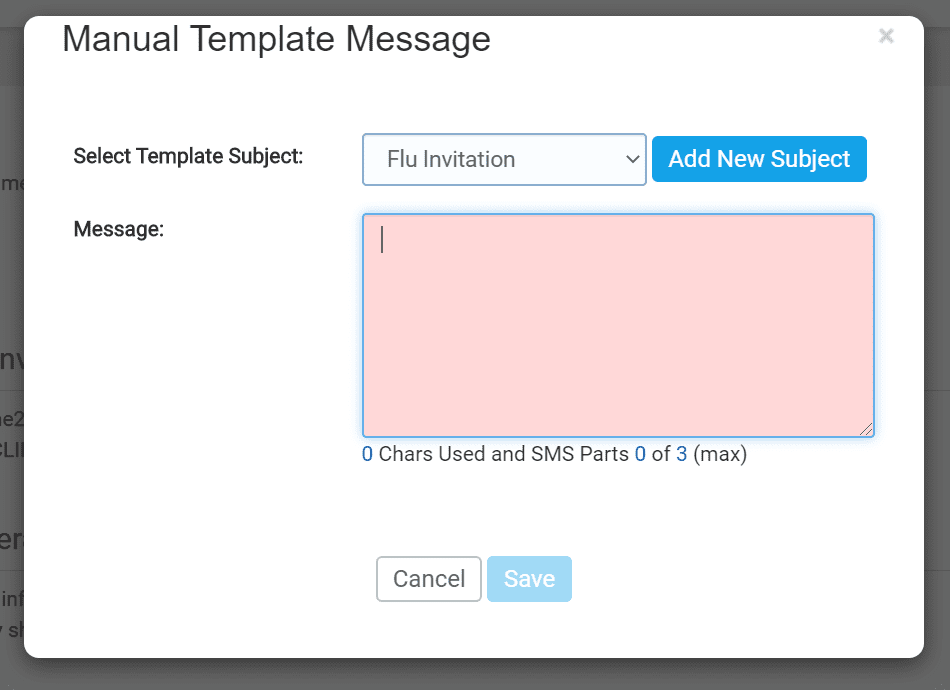
- First click on the Add New Subject button
- This will clear the Select Template Subject field
- Name your template (e.g. Coronavirus Vaccination Campaign)
- Then type your invitation into the Message field
An example of a best practice templates for a Coronavirus Vaccination Campaign is found below (alternatively, you can also create your own):
“From (surgery name): Dear <firstname2>, you are eligible for a free Covid vaccination. Call the practice on xxxxxxxxxx to book an appt. Text back REJECT to refuse .”
REJECT is set up to be the Trigger Word for this template.
- Once text is inserted, click Save
Now your template will be saved as an entry on the page and will be accessible in the New Message section.


© 2026 iPLATO. All rights reserved
Practice Area
Flu Campaign Pre-Checklist
May 17, 2021
Now to create the actual message for your Coronavirus Vaccination Campaign:
- Click on Campaigns tab found on the left-hand side menu
- Click on Templates
On this page, you will be able to create a template for Invitation message. To create this, do the following steps:
- Click Create Template
- This will bring up the Manual Template Message pop-up box
- First click on the Add New Subject button
- This will clear the Select Template Subject field
- Name your template (e.g. Coronavirus Vaccination Campaign)
- Then type your invitation into the Message field
An example of a best practice templates for a Coronavirus Vaccination Campaign is found below (alternatively, you can also create your own):
“From (surgery name): Dear <firstname2>, you are eligible for a free Covid vaccination. Call the practice on xxxxxxxxxx to book an appt. Text back REJECT to refuse .”
REJECT is set up to be the Trigger Word for this template.
- Once text is inserted, click Save
Now your template will be saved as an entry on the page and will be accessible in the New Message section.
© 2026 iPLATO. All rights reserved
Flu Campaign Pre-Checklist
May 17, 2021
This article will advise what you should prepare before sending your Flu Campaign:
Invites
- Run your searches for the cohorts you want to invite to your Flu Campaign
- Export them into an Excel or CSV file.
- Create your Flu clinic slots and slot types (you can also create one to use for online booking for example)
- Think of any extra instructions you might want to give when you send your SMS to your patients.
Groups
- Take the Excel or CSV you have exported containing the patient’s unique ID number (for Emis and Vision users) or NHS numbers (for TPP/SystmOne users).
- Go to your iPLATO Connect system and create the GROUP, ready to send. You can send up to 6000 patients at a time.
- Click here to learn more
Templates
- Create your messages in your iPLATO Connect system.
- Some examples can be FOUND HERE.
- Messages should ideally be 160 characters or less so they only use 1 SMS credit to send
Credits
- 1 SMS message is 160 characters in length.
- 1 SMS credit = 1 SMS message sent.
- Based on the size of your cohorts, check to see if you have enough credits to send your messages.
- You can see your credit balance by looking at your HOME PAGE on the iPLATO Connect platform.
Topping up
- If you think you may need more credits to send all your messages this Flu season, you can always request/purchase more.
- Please reach out to your Customer Success manager for more information at customer.success@iplato.com.
- If you self-fund the iPLATO platform, you can purchase credits from our STORE.
Custom Reminder
- Create a custom reminder for your Flu Slot type so that when people book in or book themselves in, your iPLATO system sends the reminder for the appointment for you!
- Click here to learn more
Self book
- Did you know Selfbook allows you to invite your patients for a flu campaign with the option to book their appointment directly through the myGP app? You can even send your patient a questionnaire beforehand.
- Click here to learn more
Clinical Codes
- You will be able to assign a clinical code to your outgoing campaign.
Have the clinical codes that you want to use ready. - Click here to learn more
© 2026 iPLATO. All rights reserved