

What times do my automatic reminders go out?
August 18, 2020
Watch video
The default send times for the Appointment Reminder message are 10:00am to 18:00pm. If you wish to adjust these send times, please do the following:
- Log in to your myGP Connect system
- Click on Settings found on the left-hand side menu
- Click on Gateway
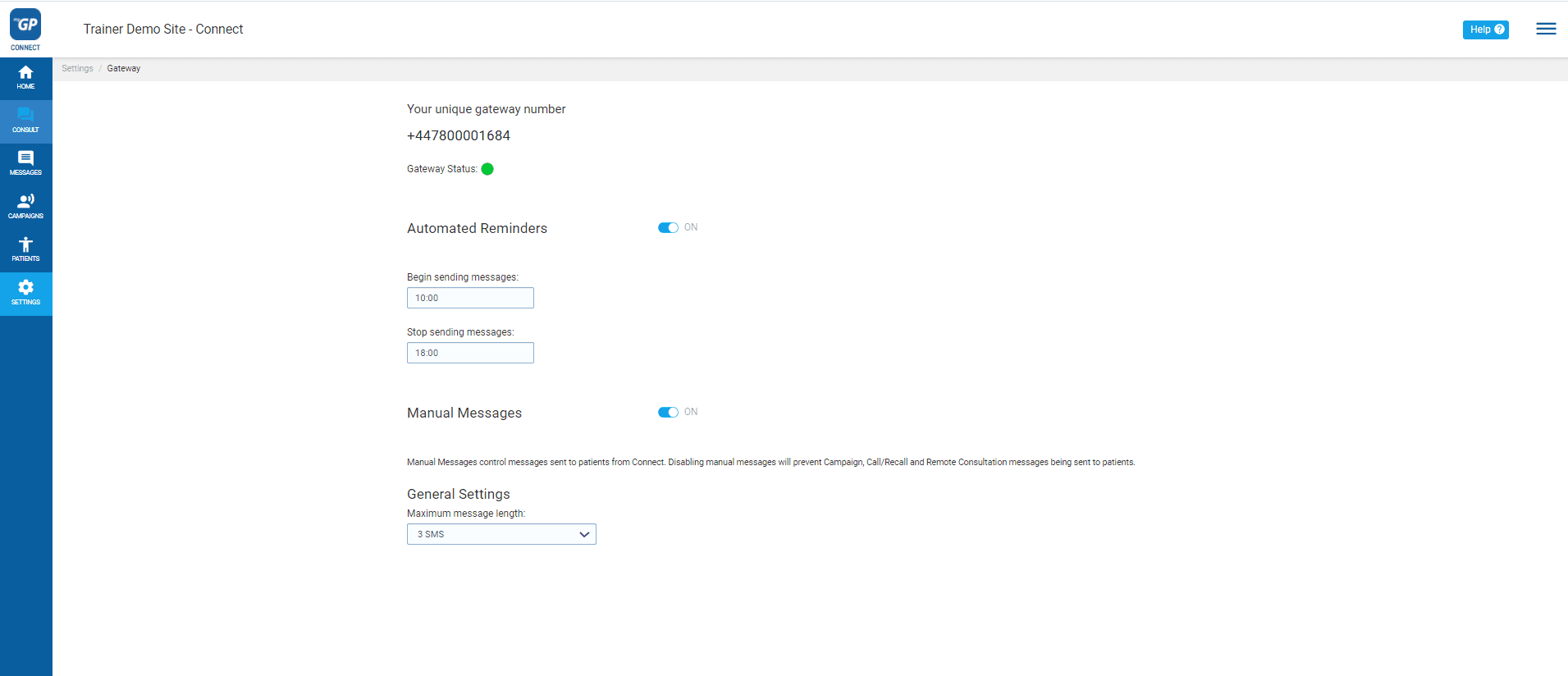
- Refer to the Automated Reminder section
- To change the start time refer to Begin sending messages and click on 10:00
- Select a new start time from the Clock drop-down menu
- To change the end time refer to Stop sending messages and click on 18:00
- Select a new end time from the Clock drop-down menu
Once selected this will assign a new send time out for messages.
Please Note: If adjusting the time, remember to select in the 24-hour format (e.g. 14:00pm, not 02:00pm).


© 2026 iPLATO. All rights reserved
Practice Area
What times do my automatic reminders go out?
August 18, 2020
Watch video
The default send times for the Appointment Reminder message are 10:00am to 18:00pm. If you wish to adjust these send times, please do the following:
- Log in to your myGP Connect system
- Click on Settings found on the left-hand side menu
- Click on Gateway
- Refer to the Automated Reminder section
- To change the start time refer to Begin sending messages and click on 10:00
- Select a new start time from the Clock drop-down menu
- To change the end time refer to Stop sending messages and click on 18:00
- Select a new end time from the Clock drop-down menu
Once selected this will assign a new send time out for messages.
Please Note: If adjusting the time, remember to select in the 24-hour format (e.g. 14:00pm, not 02:00pm).
© 2026 iPLATO. All rights reserved
What times do my automatic reminders go out?
August 18, 2020
Watch video
The default send times for the Appointment Reminder message are 10:00am to 18:00pm. If you wish to adjust these send times, please do the following:
- Log in to your myGP Connect system
- Click on Settings found on the left-hand side menu
- Click on Gateway
- Refer to the Automated Reminder section
- To change the start time refer to Begin sending messages and click on 10:00
- Select a new start time from the Clock drop-down menu
- To change the end time refer to Stop sending messages and click on 18:00
- Select a new end time from the Clock drop-down menu
Once selected this will assign a new send time out for messages.
Please Note: If adjusting the time, remember to select in the 24-hour format (e.g. 14:00pm, not 02:00pm).
© 2026 iPLATO. All rights reserved