

What is an Undelivered Report and how to set it up?
June 23, 2020
Watch video
If a text message has been unsuccessfully sent out from your myGP Connect system, it will be for two specific reasons:
- Failed Message: are messages that were rejected by the operator SMS gateway or the operator has reported the mobile number has temporarily been deactivated (e.g. their phone number no longer exists), or it is due to number being disconnected.
- Expired Message: are messages that were accepted by the operator SMS gateway but were not successfully delivered to the recipient mobile phone. They will expire after 72 hours (e.g. recipient is out of the country). Also this applies if mobile phone has been switched off or there is no signal for 72 hours.
To be notified about these messages, you can assign the Undelivered Report to an appropriate email address by following these steps:
- Log in to your myGP Connect system
- Click on Settings on the left-hand side menu
- Click Messaging Alerts
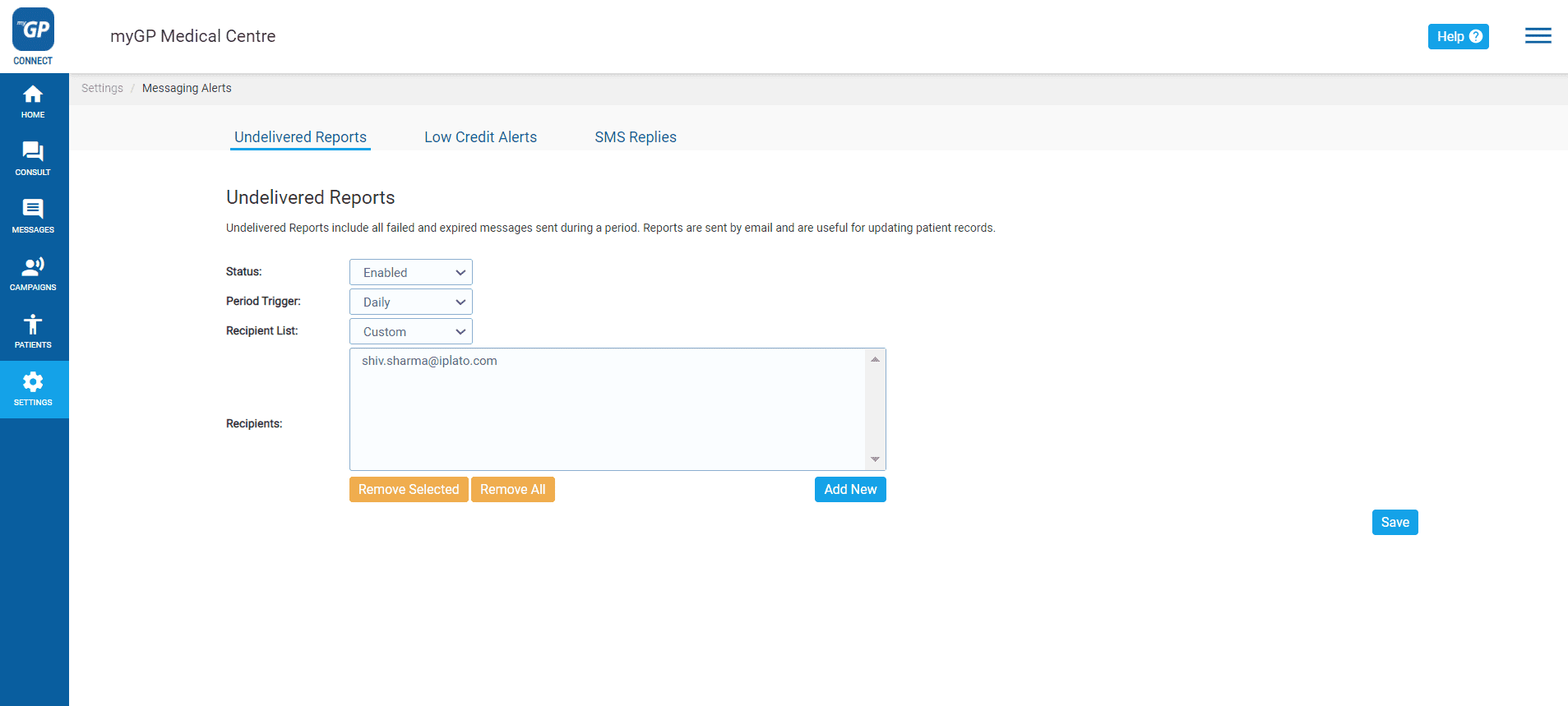
By default, the assigned Site Admin will have their email address provided to receive the Undelivered Report. If you wish to change this, please do the follow steps:
- Refer to the Recipient List column and click on Site Admins
- From drop-down select Custom, this will clear the Recipients text box
- Now click on Add New
- The Add Alert Email pop-up box will appear
- Fill in the email address in the Add Email text field
- Click Save on the pop-up box
- Click Save on the Undelivered Reports main page
TOP TIP: The Undelivered Report will be sent on a weekly basis by default. You can change this by reference the Period Trigger and clicking on the drop-down you have the option of also Daily or Monthly. Click Save on the main page to keep changes.


© 2026 iPLATO. All rights reserved
Practice Area
What is an Undelivered Report and how to set it up?
June 23, 2020
Watch video
If a text message has been unsuccessfully sent out from your myGP Connect system, it will be for two specific reasons:
- Failed Message: are messages that were rejected by the operator SMS gateway or the operator has reported the mobile number has temporarily been deactivated (e.g. their phone number no longer exists), or it is due to number being disconnected.
- Expired Message: are messages that were accepted by the operator SMS gateway but were not successfully delivered to the recipient mobile phone. They will expire after 72 hours (e.g. recipient is out of the country). Also this applies if mobile phone has been switched off or there is no signal for 72 hours.
To be notified about these messages, you can assign the Undelivered Report to an appropriate email address by following these steps:
- Log in to your myGP Connect system
- Click on Settings on the left-hand side menu
- Click Messaging Alerts
By default, the assigned Site Admin will have their email address provided to receive the Undelivered Report. If you wish to change this, please do the follow steps:
- Refer to the Recipient List column and click on Site Admins
- From drop-down select Custom, this will clear the Recipients text box
- Now click on Add New
- The Add Alert Email pop-up box will appear
- Fill in the email address in the Add Email text field
- Click Save on the pop-up box
- Click Save on the Undelivered Reports main page
TOP TIP: The Undelivered Report will be sent on a weekly basis by default. You can change this by reference the Period Trigger and clicking on the drop-down you have the option of also Daily or Monthly. Click Save on the main page to keep changes.
© 2026 iPLATO. All rights reserved
What is an Undelivered Report and how to set it up?
June 23, 2020
Watch video
If a text message has been unsuccessfully sent out from your myGP Connect system, it will be for two specific reasons:
- Failed Message: are messages that were rejected by the operator SMS gateway or the operator has reported the mobile number has temporarily been deactivated (e.g. their phone number no longer exists), or it is due to number being disconnected.
- Expired Message: are messages that were accepted by the operator SMS gateway but were not successfully delivered to the recipient mobile phone. They will expire after 72 hours (e.g. recipient is out of the country). Also this applies if mobile phone has been switched off or there is no signal for 72 hours.
To be notified about these messages, you can assign the Undelivered Report to an appropriate email address by following these steps:
- Log in to your myGP Connect system
- Click on Settings on the left-hand side menu
- Click Messaging Alerts
By default, the assigned Site Admin will have their email address provided to receive the Undelivered Report. If you wish to change this, please do the follow steps:
- Refer to the Recipient List column and click on Site Admins
- From drop-down select Custom, this will clear the Recipients text box
- Now click on Add New
- The Add Alert Email pop-up box will appear
- Fill in the email address in the Add Email text field
- Click Save on the pop-up box
- Click Save on the Undelivered Reports main page
TOP TIP: The Undelivered Report will be sent on a weekly basis by default. You can change this by reference the Period Trigger and clicking on the drop-down you have the option of also Daily or Monthly. Click Save on the main page to keep changes.
© 2026 iPLATO. All rights reserved