

What clinical codes are recorded from SMS traffic?
June 23, 2020
Watch video
Any sent or received messages within myGP Connect will have a specific clinical code associated with it. This code will be sent back to your clinical system and be saved in your patient’s records. If you wish to reference these codes, follow these steps:
- Log in to your myGP Connect System
- Click on Settings on the left-hand side menu
- Select Read Code
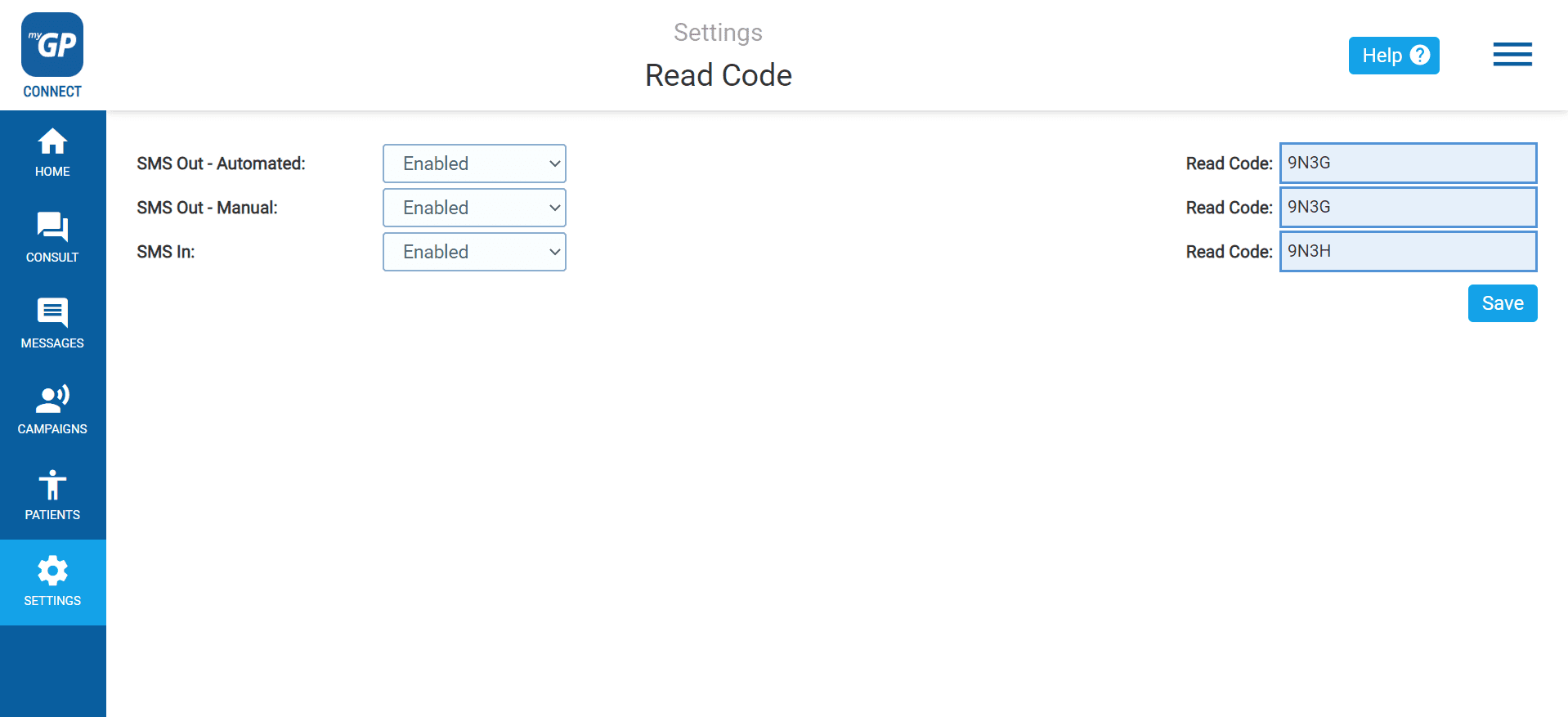
On this page you be able to reference the clinical codes for:
- SMS Out Automated: this is the code related to any automatic Appointment Reminders
- SMS Out Manual: this is the code related to any manually created message sent to patients
- SMS In: this the code related to any patient messages sent to your gateway number
Please Note: The default clinical code is set to Read Code, however, we are fully compatible with Snomed codes. If your practice has switched to Snomed, please inform our Support Team at help@iplato.com and they will transition it for you.


© 2026 iPLATO. All rights reserved
Practice Area
What clinical codes are recorded from SMS traffic?
June 23, 2020
Watch video
Any sent or received messages within myGP Connect will have a specific clinical code associated with it. This code will be sent back to your clinical system and be saved in your patient’s records. If you wish to reference these codes, follow these steps:
- Log in to your myGP Connect System
- Click on Settings on the left-hand side menu
- Select Read Code
On this page you be able to reference the clinical codes for:
- SMS Out Automated: this is the code related to any automatic Appointment Reminders
- SMS Out Manual: this is the code related to any manually created message sent to patients
- SMS In: this the code related to any patient messages sent to your gateway number
Please Note: The default clinical code is set to Read Code, however, we are fully compatible with Snomed codes. If your practice has switched to Snomed, please inform our Support Team at help@iplato.com and they will transition it for you.
© 2026 iPLATO. All rights reserved
What clinical codes are recorded from SMS traffic?
June 23, 2020
Watch video
Any sent or received messages within myGP Connect will have a specific clinical code associated with it. This code will be sent back to your clinical system and be saved in your patient’s records. If you wish to reference these codes, follow these steps:
- Log in to your myGP Connect System
- Click on Settings on the left-hand side menu
- Select Read Code
On this page you be able to reference the clinical codes for:
- SMS Out Automated: this is the code related to any automatic Appointment Reminders
- SMS Out Manual: this is the code related to any manually created message sent to patients
- SMS In: this the code related to any patient messages sent to your gateway number
Please Note: The default clinical code is set to Read Code, however, we are fully compatible with Snomed codes. If your practice has switched to Snomed, please inform our Support Team at help@iplato.com and they will transition it for you.
© 2026 iPLATO. All rights reserved