

The default Automatic Reminder
June 22, 2020
Your Standard Default reminder
- Log in to your iPLATO Connect system
- Select Settings from the left-hand side menu
- Then click on Automatic Reminders
- This will bring you directly to the Automatic Reminders page
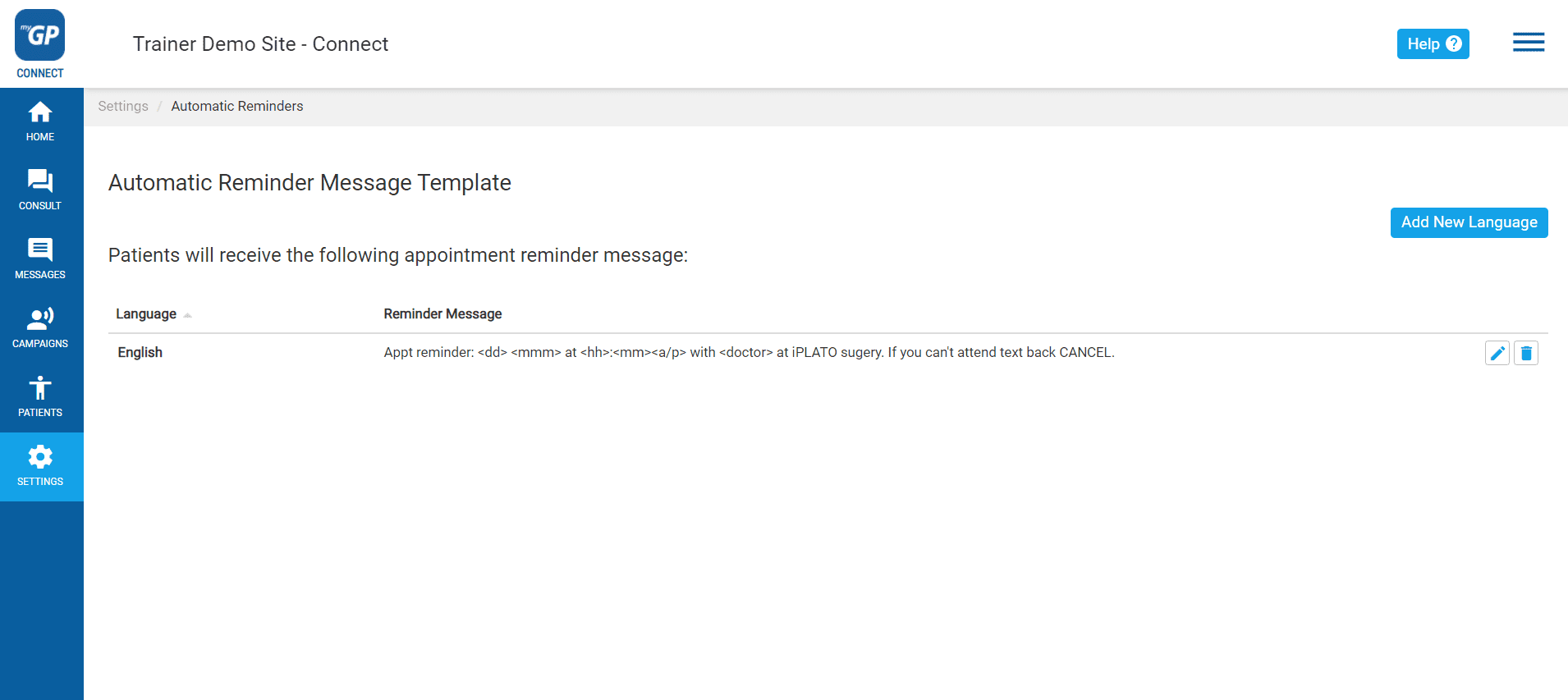
On this page, you will see the default Appointment Reminder text message in the Reminder Message text box.

Click on the Edit icon on the right to amend the message if you need to.
This will bring up a box that will allow you to edit your message.
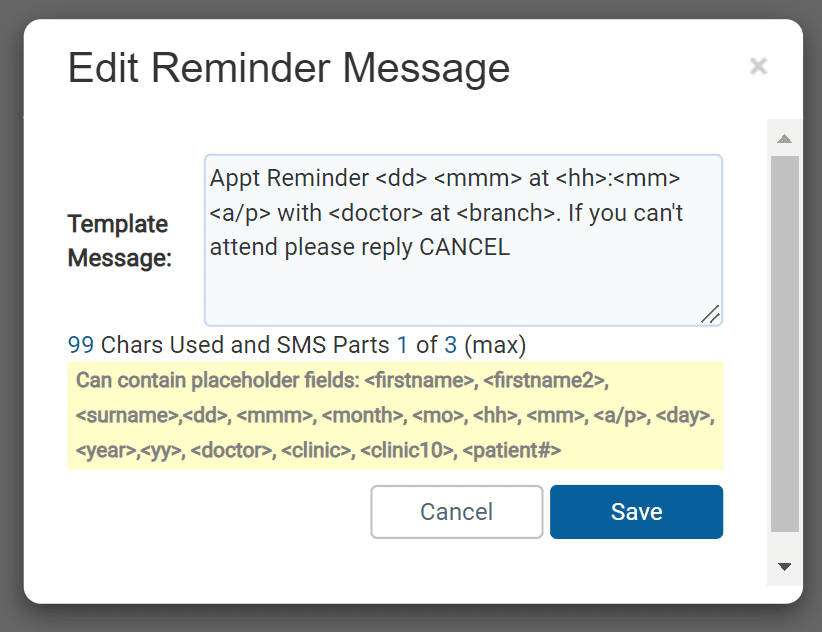
SMS message length
Top tip! – 1 SMS message is 160 characters in length. Keep your messages below 160 characters where possible to save the NHS money.
If you wish to remind your patients that this message is not a contact platform, you can add the sentence This is an unmonitored service at the end of the default text message.
Variable fields for Appointment Reminders:
The text in brackets is Mail Merges, which the software will automatically fill in based on the appointment information.
- <mmm>
- The month of the appointment (in three-character abbreviations, i.e. ‘Aug’)
- <month>
- The month of the appointment (no abbreviations, i.e. ‘August’)
- <dd>
- The date of the appointment (i.e. ’12’, for August 12)
- <year>
- The year of the appointment (i.e. 2007)
- <hh>
- The hour of the appointment (standard format NOT 24-hour format)
- <mm>
- The minute of the appointment
- <a/p>
- To specify the appointment’s time ‘before noon’ or ‘after noon’, indicated as ‘am’ or ‘pm’
- <doctor>
- The name of the doctor/session holder (as specified on the clinical system, i.e. ‘Dr Jon Waters’)
- <branch>
- Adds the name of any branch locations you may have (EMIS ONLY)
- <clinic>
- Adds the name of any branch locations you may have (SYSTEMONE ONLY)
- <clinic10>
- The name of the healthcare site truncated after 10 characters as specified on the clinical system, i.e. ‘Greenvale’ (SYSTMONE ONLY)
You can use any or all variable fields in the Appointment Reminder by typing their code directly into the message body, for example:
This is a reminder of your appointment on <mmm> <dd> at <hh>:<mm><a/p> with <doctor>.


© 2026 iPLATO. All rights reserved
Practice Area
The default Automatic Reminder
June 22, 2020
Your Standard Default reminder
- Log in to your iPLATO Connect system
- Select Settings from the left-hand side menu
- Then click on Automatic Reminders
- This will bring you directly to the Automatic Reminders page
On this page, you will see the default Appointment Reminder text message in the Reminder Message text box.
Click on the Edit icon on the right to amend the message if you need to.
This will bring up a box that will allow you to edit your message.
SMS message length
Top tip! – 1 SMS message is 160 characters in length. Keep your messages below 160 characters where possible to save the NHS money.
If you wish to remind your patients that this message is not a contact platform, you can add the sentence This is an unmonitored service at the end of the default text message.
Variable fields for Appointment Reminders:
The text in brackets is Mail Merges, which the software will automatically fill in based on the appointment information.
- <mmm>
- The month of the appointment (in three-character abbreviations, i.e. ‘Aug’)
- <month>
- The month of the appointment (no abbreviations, i.e. ‘August’)
- <dd>
- The date of the appointment (i.e. ’12’, for August 12)
- <year>
- The year of the appointment (i.e. 2007)
- <hh>
- The hour of the appointment (standard format NOT 24-hour format)
- <mm>
- The minute of the appointment
- <a/p>
- To specify the appointment’s time ‘before noon’ or ‘after noon’, indicated as ‘am’ or ‘pm’
- <doctor>
- The name of the doctor/session holder (as specified on the clinical system, i.e. ‘Dr Jon Waters’)
- <branch>
- Adds the name of any branch locations you may have (EMIS ONLY)
- <clinic>
- Adds the name of any branch locations you may have (SYSTEMONE ONLY)
- <clinic10>
- The name of the healthcare site truncated after 10 characters as specified on the clinical system, i.e. ‘Greenvale’ (SYSTMONE ONLY)
You can use any or all variable fields in the Appointment Reminder by typing their code directly into the message body, for example:
This is a reminder of your appointment on <mmm> <dd> at <hh>:<mm><a/p> with <doctor>.
© 2026 iPLATO. All rights reserved
The default Automatic Reminder
June 22, 2020
Your Standard Default reminder
- Log in to your iPLATO Connect system
- Select Settings from the left-hand side menu
- Then click on Automatic Reminders
- This will bring you directly to the Automatic Reminders page
On this page, you will see the default Appointment Reminder text message in the Reminder Message text box.
Click on the Edit icon on the right to amend the message if you need to.
This will bring up a box that will allow you to edit your message.
SMS message length
Top tip! – 1 SMS message is 160 characters in length. Keep your messages below 160 characters where possible to save the NHS money.
If you wish to remind your patients that this message is not a contact platform, you can add the sentence This is an unmonitored service at the end of the default text message.
Variable fields for Appointment Reminders:
The text in brackets is Mail Merges, which the software will automatically fill in based on the appointment information.
- <mmm>
- The month of the appointment (in three-character abbreviations, i.e. ‘Aug’)
- <month>
- The month of the appointment (no abbreviations, i.e. ‘August’)
- <dd>
- The date of the appointment (i.e. ’12’, for August 12)
- <year>
- The year of the appointment (i.e. 2007)
- <hh>
- The hour of the appointment (standard format NOT 24-hour format)
- <mm>
- The minute of the appointment
- <a/p>
- To specify the appointment’s time ‘before noon’ or ‘after noon’, indicated as ‘am’ or ‘pm’
- <doctor>
- The name of the doctor/session holder (as specified on the clinical system, i.e. ‘Dr Jon Waters’)
- <branch>
- Adds the name of any branch locations you may have (EMIS ONLY)
- <clinic>
- Adds the name of any branch locations you may have (SYSTEMONE ONLY)
- <clinic10>
- The name of the healthcare site truncated after 10 characters as specified on the clinical system, i.e. ‘Greenvale’ (SYSTMONE ONLY)
You can use any or all variable fields in the Appointment Reminder by typing their code directly into the message body, for example:
This is a reminder of your appointment on <mmm> <dd> at <hh>:<mm><a/p> with <doctor>.
© 2026 iPLATO. All rights reserved