

/
Appointment Reminder
/
How to exclude Automatic Reminders from sending out on weekends or holidays
How to exclude Automatic Reminders from sending out on weekends or holidays
August 18, 2020
Watch video
You are able to program Appointment Reminders from sending out on weekends and/or specific holidays. In order to action this, please do the following steps:
- Log in to your myGP Connect system
- Click on Settings found on the left-hand side menu
- Click on Reminder Settings
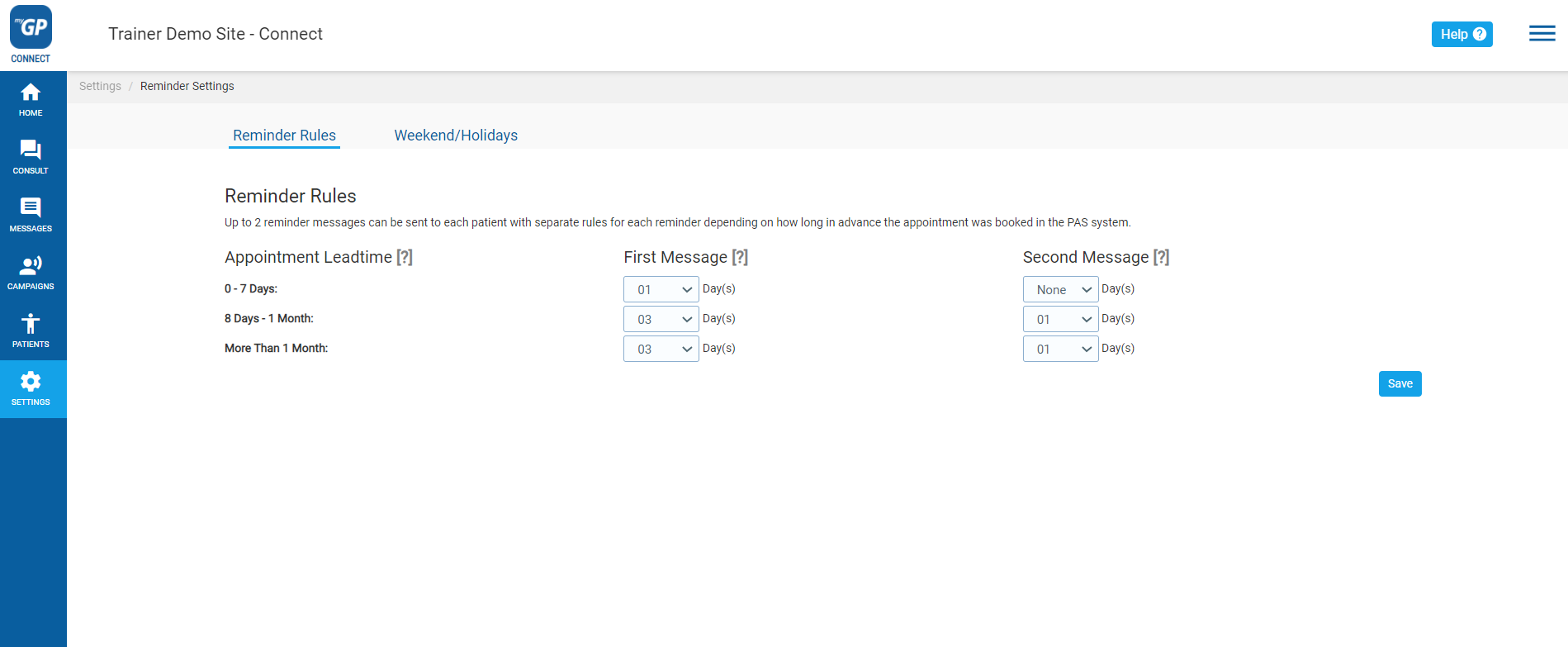
Now refer to the sub-tabs on the page:
- Click on Weekend/Holiday sub-tab
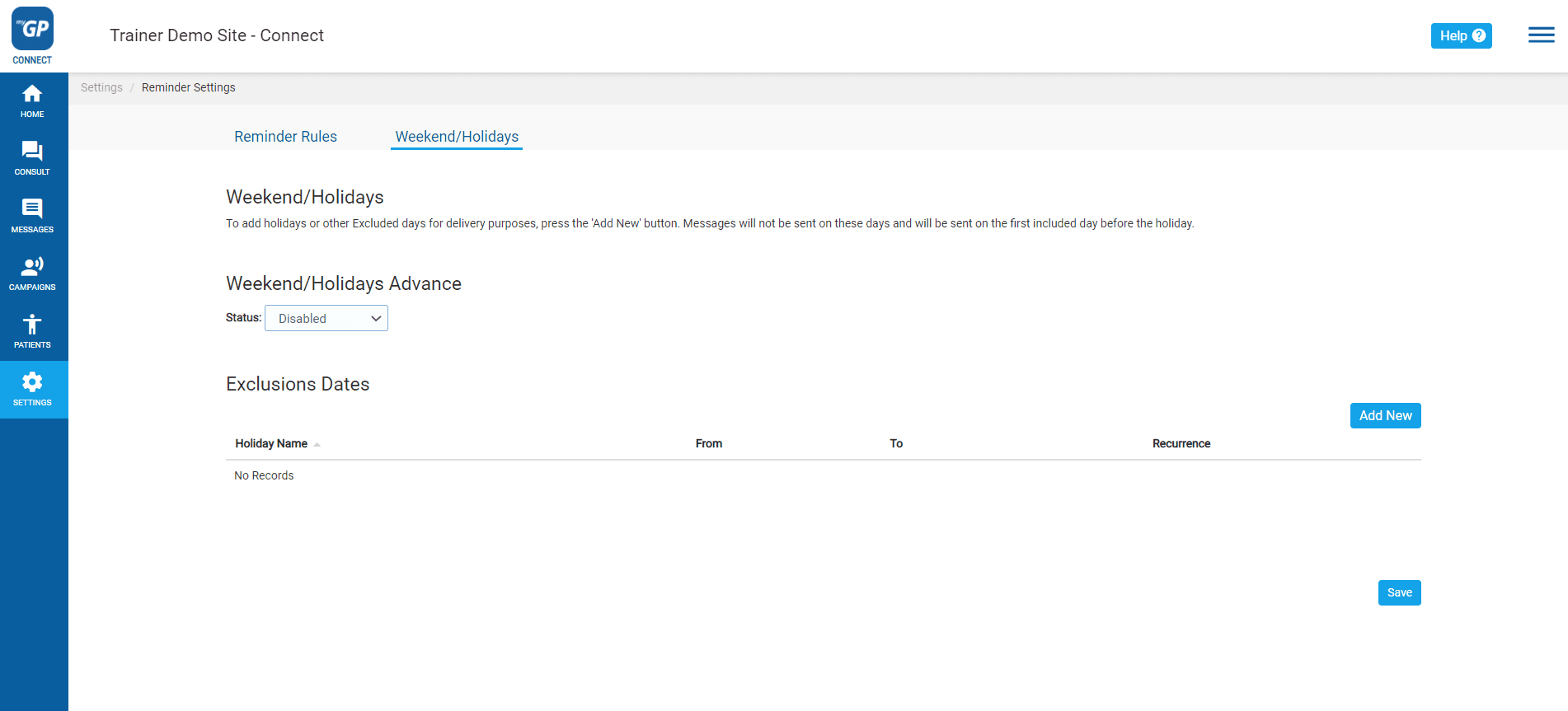
- Click on Disabled in the Status field
- Choose Enabled
Weekends have now been excluded. To set up a specific holiday to be excluded, follow these steps:
- Click Add New to the far right of page
- We will see the Add Exclusion pop-up box
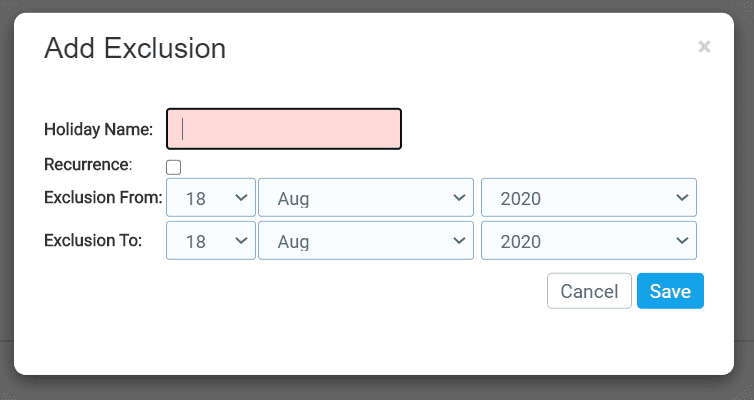
- Fill in the specific holiday in the Holiday Name field
- Tick the Recurrence box if you wish this exclusion to repeat
- Assign your holiday start date in the Exclusion From section
- Assign your holiday end date in the Exclusion To section
- Click Save
It will now appear as a saved entry in the Weekend/Holidays section.
TOP TIP: You can delete a Holiday entry by clicking on the delete icon to the far right of a saved Holiday Exclusion entry.


© 2026 iPLATO. All rights reserved
Practice Area
/
Appointment Reminder
/
How to exclude Automatic Reminders from sending out on weekends or holidays
How to exclude Automatic Reminders from sending out on weekends or holidays
August 18, 2020
Watch video
You are able to program Appointment Reminders from sending out on weekends and/or specific holidays. In order to action this, please do the following steps:
- Log in to your myGP Connect system
- Click on Settings found on the left-hand side menu
- Click on Reminder Settings
Now refer to the sub-tabs on the page:
- Click on Weekend/Holiday sub-tab
- Click on Disabled in the Status field
- Choose Enabled
Weekends have now been excluded. To set up a specific holiday to be excluded, follow these steps:
- Click Add New to the far right of page
- We will see the Add Exclusion pop-up box
- Fill in the specific holiday in the Holiday Name field
- Tick the Recurrence box if you wish this exclusion to repeat
- Assign your holiday start date in the Exclusion From section
- Assign your holiday end date in the Exclusion To section
- Click Save
It will now appear as a saved entry in the Weekend/Holidays section.
TOP TIP: You can delete a Holiday entry by clicking on the delete icon to the far right of a saved Holiday Exclusion entry.
© 2026 iPLATO. All rights reserved
/
Appointment Reminder/
How to exclude Automatic Reminders from sending out on weekends or holidays
How to exclude Automatic Reminders from sending out on weekends or holidays
August 18, 2020
Watch video
You are able to program Appointment Reminders from sending out on weekends and/or specific holidays. In order to action this, please do the following steps:
- Log in to your myGP Connect system
- Click on Settings found on the left-hand side menu
- Click on Reminder Settings
Now refer to the sub-tabs on the page:
- Click on Weekend/Holiday sub-tab
- Click on Disabled in the Status field
- Choose Enabled
Weekends have now been excluded. To set up a specific holiday to be excluded, follow these steps:
- Click Add New to the far right of page
- We will see the Add Exclusion pop-up box
- Fill in the specific holiday in the Holiday Name field
- Tick the Recurrence box if you wish this exclusion to repeat
- Assign your holiday start date in the Exclusion From section
- Assign your holiday end date in the Exclusion To section
- Click Save
It will now appear as a saved entry in the Weekend/Holidays section.
TOP TIP: You can delete a Holiday entry by clicking on the delete icon to the far right of a saved Holiday Exclusion entry.
© 2026 iPLATO. All rights reserved