

/
Appointment Reminder
/
How to enable/disable Appointment Reminders via Slots, Clinicians or Clinics?
How to enable/disable Appointment Reminders via Slots, Clinicians or Clinics?
June 23, 2020
By default all Session Holder, Session Clinic, or Slot Types from your clinical system, will be enabled to send out Appointment Reminders.
To manage your Appointment Reminders:
- Log in to your myGP Connect system
- Click on Settings on the left-hand side menu
- Click on Exclusions
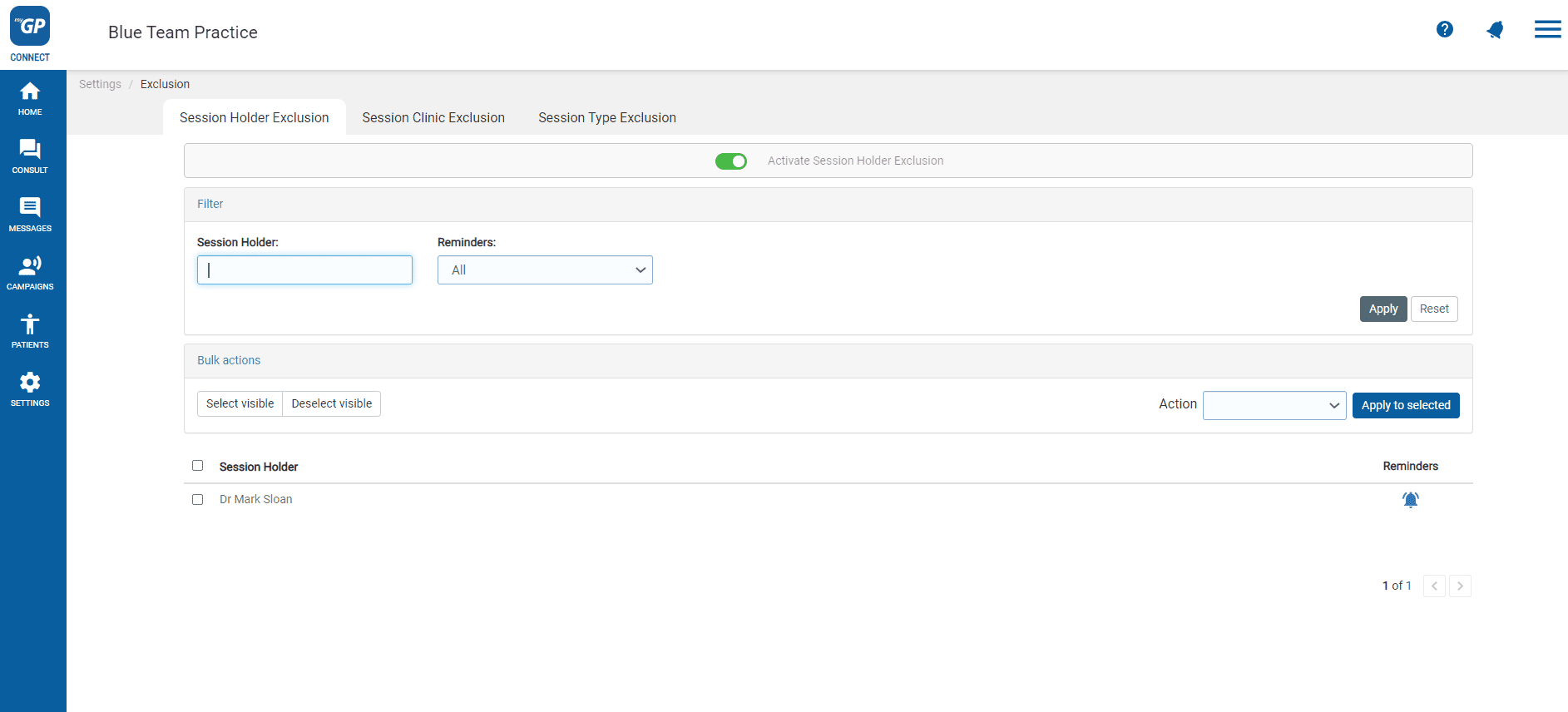
On this page you can customise reminders being sent based on the following tabs:
- Session Holder Exclusion: will allow you to exclude an appointment based on Clinicians
- Session Clinic Exclusion: will allow you to exclude an appointment based on Clinics
- Slot Type Exclusion: will allow you to exclude an appointment based on Slots (this includes a unique feature to mark Sensitive Appointments)
To disable a specific Clinician, Clinic or Slot Type from sending out a reminder, simply:
- Refer to the Reminders column to the right of the item
- Click on the Bell icon
- It will change from Blue to Grey, signifying it has been disabled
Please Note: If you are a Vision user, the Session Clinic section will not be available. For TPP/SystmOne users, the Session Clinic section only displays your branch locations.
Top Tip: By default, Exclusions will be switched to enabled. If you wish to disable, click the Activate the Session Holder Exclusions at the top of the page.


© 2026 iPLATO. All rights reserved
Practice Area
/
Appointment Reminder
/
How to enable/disable Appointment Reminders via Slots, Clinicians or Clinics?
How to enable/disable Appointment Reminders via Slots, Clinicians or Clinics?
June 23, 2020
By default all Session Holder, Session Clinic, or Slot Types from your clinical system, will be enabled to send out Appointment Reminders.
To manage your Appointment Reminders:
- Log in to your myGP Connect system
- Click on Settings on the left-hand side menu
- Click on Exclusions
On this page you can customise reminders being sent based on the following tabs:
- Session Holder Exclusion: will allow you to exclude an appointment based on Clinicians
- Session Clinic Exclusion: will allow you to exclude an appointment based on Clinics
- Slot Type Exclusion: will allow you to exclude an appointment based on Slots (this includes a unique feature to mark Sensitive Appointments)
To disable a specific Clinician, Clinic or Slot Type from sending out a reminder, simply:
- Refer to the Reminders column to the right of the item
- Click on the Bell icon
- It will change from Blue to Grey, signifying it has been disabled
Please Note: If you are a Vision user, the Session Clinic section will not be available. For TPP/SystmOne users, the Session Clinic section only displays your branch locations.
Top Tip: By default, Exclusions will be switched to enabled. If you wish to disable, click the Activate the Session Holder Exclusions at the top of the page.
© 2026 iPLATO. All rights reserved
/
Appointment Reminder/
How to enable/disable Appointment Reminders via Slots, Clinicians or Clinics?
How to enable/disable Appointment Reminders via Slots, Clinicians or Clinics?
June 23, 2020
By default all Session Holder, Session Clinic, or Slot Types from your clinical system, will be enabled to send out Appointment Reminders.
To manage your Appointment Reminders:
- Log in to your myGP Connect system
- Click on Settings on the left-hand side menu
- Click on Exclusions
On this page you can customise reminders being sent based on the following tabs:
- Session Holder Exclusion: will allow you to exclude an appointment based on Clinicians
- Session Clinic Exclusion: will allow you to exclude an appointment based on Clinics
- Slot Type Exclusion: will allow you to exclude an appointment based on Slots (this includes a unique feature to mark Sensitive Appointments)
To disable a specific Clinician, Clinic or Slot Type from sending out a reminder, simply:
- Refer to the Reminders column to the right of the item
- Click on the Bell icon
- It will change from Blue to Grey, signifying it has been disabled
Please Note: If you are a Vision user, the Session Clinic section will not be available. For TPP/SystmOne users, the Session Clinic section only displays your branch locations.
Top Tip: By default, Exclusions will be switched to enabled. If you wish to disable, click the Activate the Session Holder Exclusions at the top of the page.
© 2026 iPLATO. All rights reserved