

How to edit the default Automatic Reminder?
June 22, 2020
Watch video
If you wish to edit the default Appointment Reminder, do the following:
- Log-in to myGP Connect
- Select Settings from the left-hand side menu
- Then click on Automatic Reminders
- This will bring directly to the Automatic Reminders page
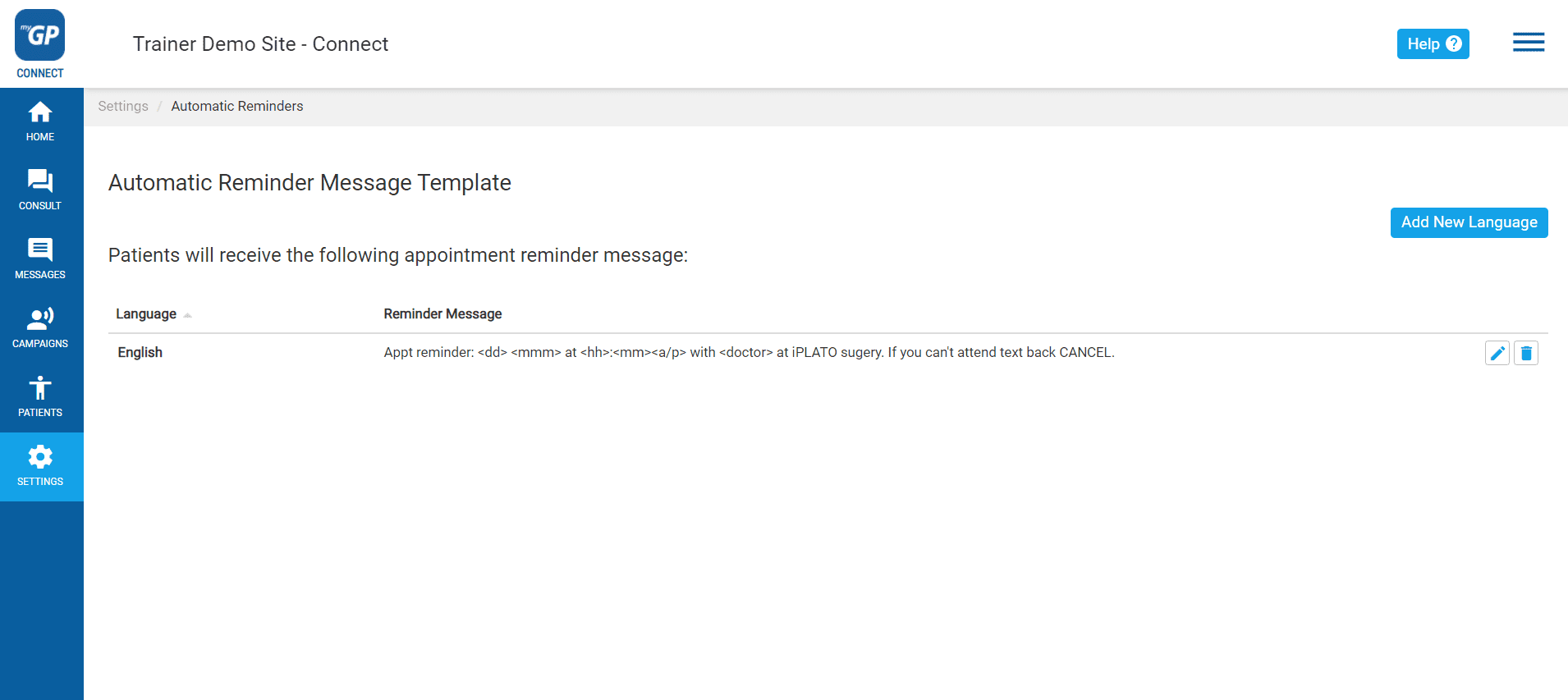
- Click on the Edit icon (the pen-and paper graphic)
- You will see then see the Edit Reminder Message pop-up box.
By clicking on the text, you are able to add or subtract any of the default text. You will also have Mail Merges available underneath the text box if you wish to add additional ones, just copy and paste into the message.
TOP TIP: If you wish to remind your patients that this message is not a contact platform, you can add the sentence this is an unmonitored service at the end of the default text message.
Please Note: If you adjust the text, be aware that 160 characters is the limit for 1 message to be sent out from 1 credit.


© 2026 iPLATO. All rights reserved
Practice Area
How to edit the default Automatic Reminder?
June 22, 2020
Watch video
If you wish to edit the default Appointment Reminder, do the following:
- Log-in to myGP Connect
- Select Settings from the left-hand side menu
- Then click on Automatic Reminders
- This will bring directly to the Automatic Reminders page
- Click on the Edit icon (the pen-and paper graphic)
- You will see then see the Edit Reminder Message pop-up box.
By clicking on the text, you are able to add or subtract any of the default text. You will also have Mail Merges available underneath the text box if you wish to add additional ones, just copy and paste into the message.
TOP TIP: If you wish to remind your patients that this message is not a contact platform, you can add the sentence this is an unmonitored service at the end of the default text message.
Please Note: If you adjust the text, be aware that 160 characters is the limit for 1 message to be sent out from 1 credit.
© 2026 iPLATO. All rights reserved
How to edit the default Automatic Reminder?
June 22, 2020
Watch video
If you wish to edit the default Appointment Reminder, do the following:
- Log-in to myGP Connect
- Select Settings from the left-hand side menu
- Then click on Automatic Reminders
- This will bring directly to the Automatic Reminders page
- Click on the Edit icon (the pen-and paper graphic)
- You will see then see the Edit Reminder Message pop-up box.
By clicking on the text, you are able to add or subtract any of the default text. You will also have Mail Merges available underneath the text box if you wish to add additional ones, just copy and paste into the message.
TOP TIP: If you wish to remind your patients that this message is not a contact platform, you can add the sentence this is an unmonitored service at the end of the default text message.
Please Note: If you adjust the text, be aware that 160 characters is the limit for 1 message to be sent out from 1 credit.
© 2026 iPLATO. All rights reserved